
There is a bug in Google My Business website URLs that causes a 404 error on most websites. Users who use the Google Maps app to click through to a local business’ website address with certain tracking parameters will encounter a 404 error. Depending on how the 404 error is configured on the local business website, it may cause the user to simply search for another business. For a local business, 404 errors can be a nightmare and cause them to lose valuable leads and sales.
If first discovered this error when investigating why one of my local business clients called me. They usually get regular calls, leads, and sales, but for some reason those had significantly slowed down and virtually stopped. I proceeded to review all of their local listings, the traffic, and the Google Analytics data, as well as their rankings. The business was still listed well (in 2nd position) like they always have been for a while. In fact, traffic and clicks to the business listing, according to Google Search Console and Google My Business (Insights), everything looked good. It was actually better than normal. I made sure that the phone number was correct, the address and name of the business had not changed, and clicked on the links to contact the business. As far as I could tell, everything looked good on my laptop. I checked Google Chrome, Firefox, and Safari.
I picked up my iPhone. I searched the business on mobile, using Safari and again, clicking all the links and looking at the listing everything was working as it should. But then I opened the Google Maps app. I searched for the business, found it, clicked on the listing, and then reviewed it. Everything looked good until I clicked the “website” link on the listing and it went to a 404 error on the website. Whoops! Not good. Tracking parameters were set up on the Google My Business listing so that we could track the clicks from the Google My Business listing to the website. And the clicks on the Google Maps app were going to 404 errors, meaning that we essentially couldn’t track those clicks (except if we looked at 404 errors on the site), and, even more importantly, it lead to a bad user experience, causing a drop in the number of leads and sales.
What Is the Error or Bug?
It turns out that there is a bug in the Google Maps app. When a tracking parameter is added to the URL in a Google My Business listing as a website or appointment URL, the Google Maps app changes it to another URL. The way it changes the URL causes a 404 error on most websites.
I was able to replicate this bug on my own Google My Business listing, so I’ll use my own listing to describe and show you the exact bug.
In Google My Business, you can add two links to your website. One of the links is an “appointment URL” link, the other is a “website” link. They both look like this:
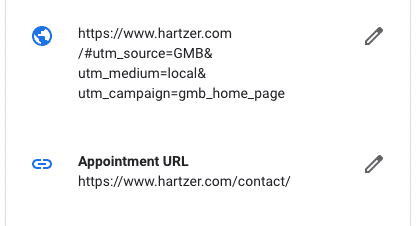
As you can see, I’ve added a tracking parameter to the website link (the one on top) that looks like this:
https://www.hartzer.com/#utm_source=GMB&utm_medium=local&utm_campaign=gmb_home_page
That URL allows me to see the clicks to the website’s home page in Google Analytics and see how many people are actually clicking on the Google My Business listing. It’s pretty helpful, as typically Google My Business clicks can show up as “direct” traffic to your website in Google Analytics, which is not helpful. And if you add tracking parameters to the Appointment URL (like to the contact page on your site), you can distinguish between website home page clicks and appointment clicks. The URL in the above screen capture in Google My Business on the appointment URL does not have any tracking URLs on it.
Here’s where the Google My Business bug and Google Maps bug occurs. Notice that in the tracking URL there is a # (pound sign or hashtag). Several UTM tracking tools that help you create tracking parameters use hashtags in their URLs. For example, Google’s own Campaign URL Builder helps you create these. I’ve been using that tool for YEARS to create tracking on campaigns. It inserts a # hashtag in the URL. No big deal, right?!?
Well, if you use that tracking parameter in Google My Business to track clicks on the website and appointment URLs, those will lead to 404 errors on your website. Why? The Google Maps app changes the URL and changes the # hashtag, it removes the hashtag from the URL, causing the 404 error.
Example of the Google My Business Bug
Here are some screen captures that explain what exactly is happening:
As I mentioned above, I added this to the URL:
#utm_source=GMB&utm_medium=local&utm_campaign=gmb_home_page
Notice that the hashtag is at the beginning. When you search for the local business on mobile, you’ll see the business listing and a website URL, I’ve circled it in red below:

Notice that I’ve copied the URL and am looking at it in the mobile browser below. It has the hashtag, which is good.

Then, let’s look at the same website URL link in the Google Maps app:

Notice above that instead of “website” it shows the domain name, which is hartzer.com in this example. If you click on that website link, it leads to a 404 error on the website, as shown below:
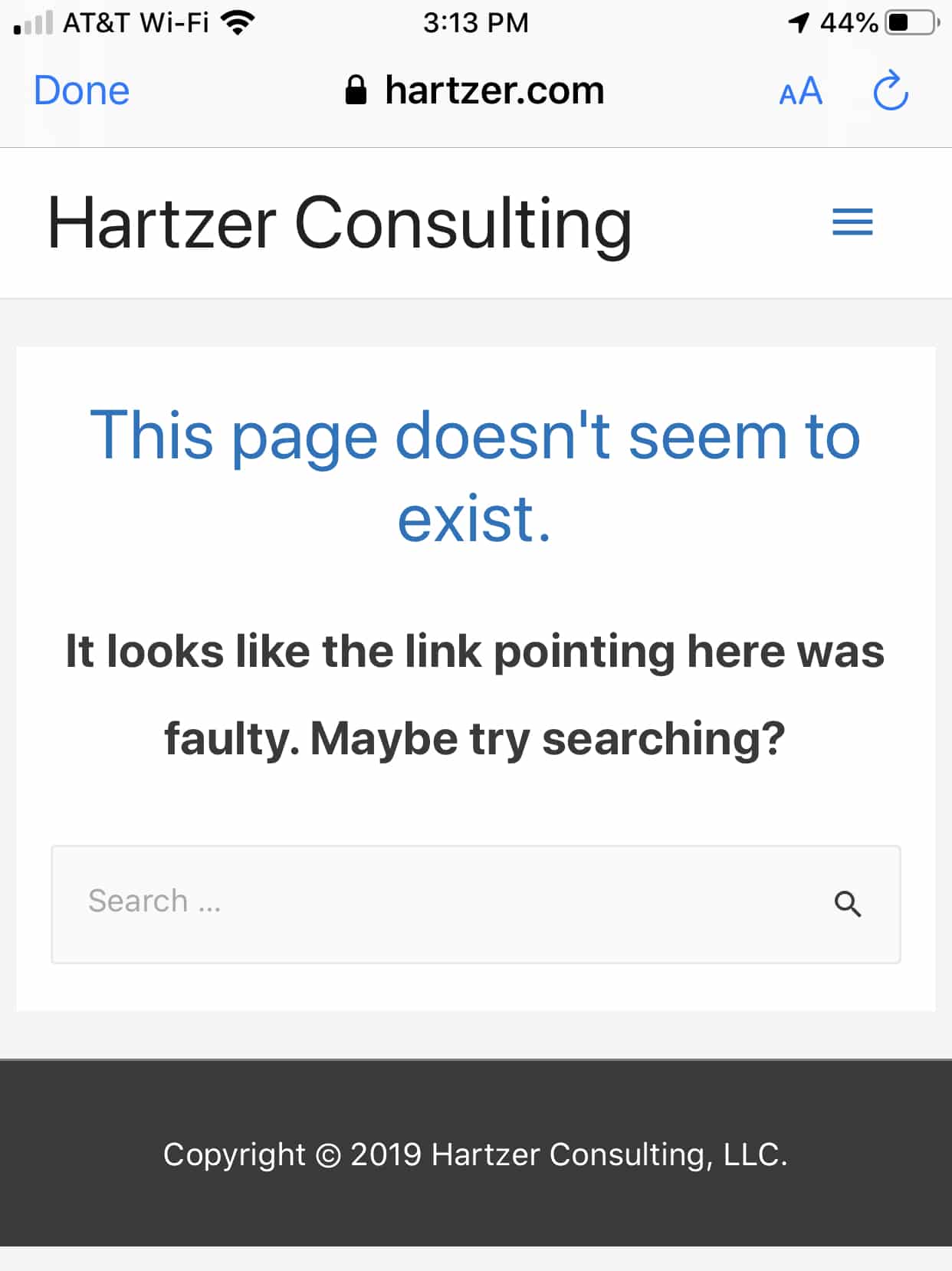
Let’s take a look at the URL that Google Maps has, and see the why it’s leading to a 404 error:
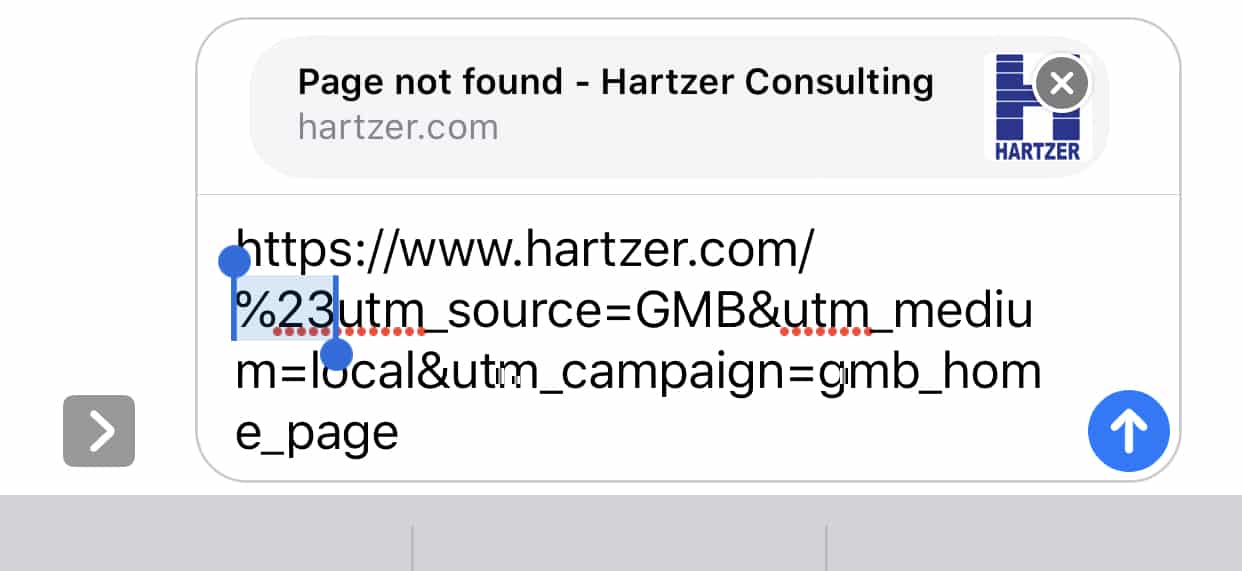
As you can see, in the Google Maps app, Google Maps changes the URL and removes the hashtag in the URL. Google Maps changes the URL so that the hashtag is a % 23 and not a hashtag. So, as a result of this, any clicks on that URL lead to a 404 error on the website.
Here’s a quick video that shows the exact error on the Google Maps app and how it’s leading to a 404 error because Google changes the URL:
What Can You Do?
Well, what can you do to fix this bug in Google Maps, specifically in the Google Maps app? There are two things you can do: change your URLs so that they use a ? instead of a hashtag even though Google’s own UTM builder tool recommends using a hashtag. The other thing you can do is to remove the tracking parameters altogether and just go with no tracking parameters at all. In this case, we don’t necessarily need to track the clicks from Google My Business, it’s just something nice to know. So, for certain small businesses whose GMB listings I manage I’ve just gone in and removed the tracking. I don’t look at their analytics that often anyway, as there are only a few hundred visits a month to the businesses and I’m the only one looking at analytics. But, as I mentioned, if you do need the tracking, change the # to a ? and it “should” work. Then, check the listings on the Google Maps app to make sure that the links don’t lead to 404 errors.