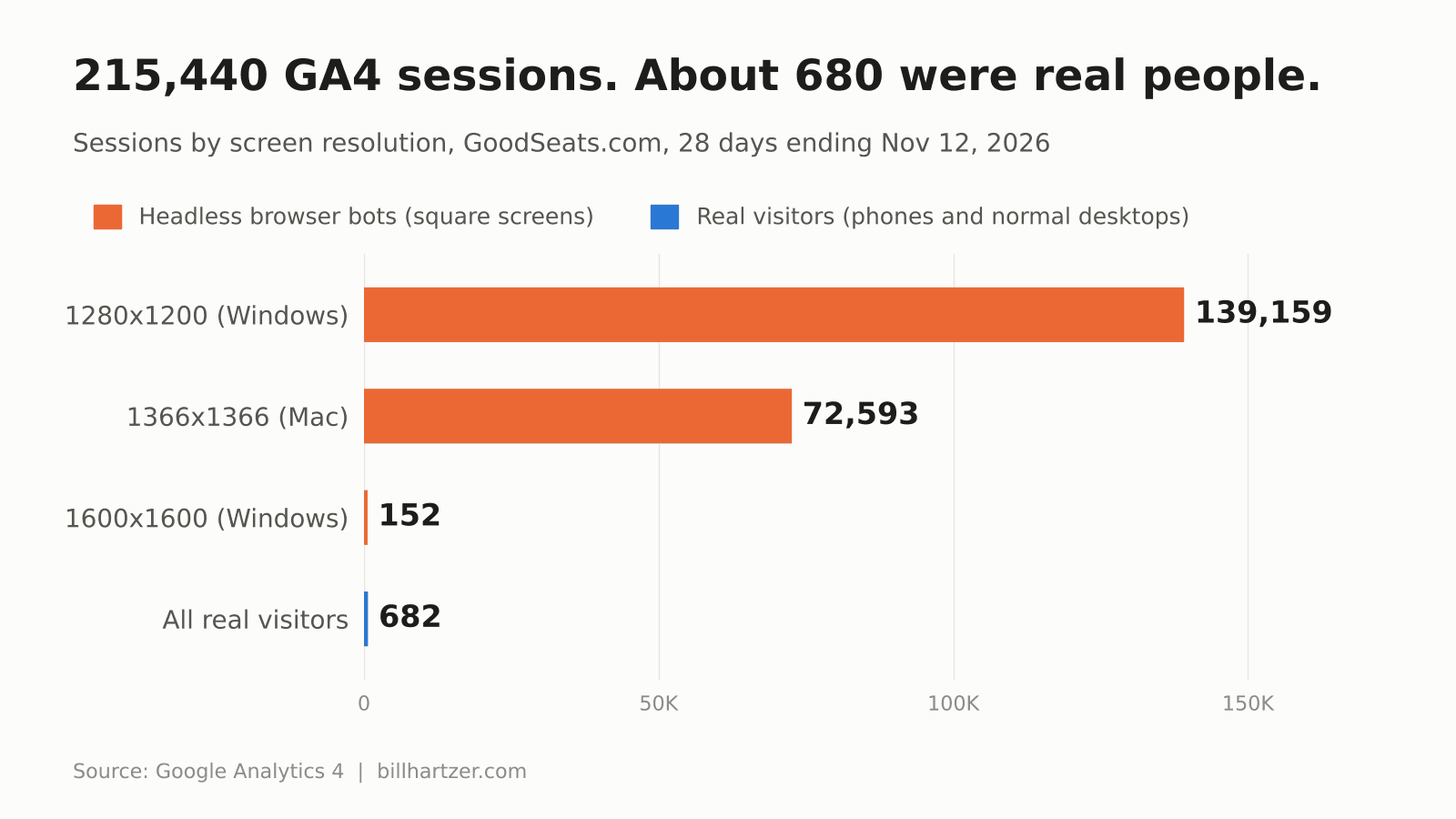
Good Seats, a ticket site I work on, recorded 215,440 sessions in Google Analytics 4 over 28 days. After I filtered out the bots, about 680 were left. Roughly 99.7 percent of the traffic in that analytics account was automated browsers pretending to be people, and Google Analytics counted every one of them as a visitor.
That is not a rounding error. It means every number in the account was wrong: engagement rate, top traffic sources, conversion rate, all of it. GA4 does exclude bots on its own, but only the ones on a published list. The ones hitting the site were headless browsers (web browsers with no screen, run by software on cloud servers) built to look like ordinary Chrome users, and they walked straight past the filter.
If your direct traffic jumped this year and your engagement rate fell through the floor, check your screen resolution report before you blame your content. I have been reading analytics accounts for more than 25 years, and bot traffic does not get much more lopsided than this. Below is what I found, the method I borrowed to fix it, why I changed that method, and the exact setup, including a file you can hand to Claude so it does the Google Analytics work for you.
Where the Idea Came From
The detection method is not mine. Dana DiTomaso, who runs the Your Analytics Playbook newsletter, published How I’m Removing Bot Traffic from GA4 on LinkedIn on October 29, 2026. Her client, a Realtor in Edmonton, Alberta, started getting heavy traffic from China and Singapore in October 2025. Every page on the site was being visited two to ten times per session. No Edmonton real estate shopper browses like that.
She tested twelve different browser checks with Claude’s help and landed on one as the most reliable: the graphics card.
Real phones and computers report real graphics hardware through WebGL, the browser’s built-in 3D graphics interface. An iPhone reports “Apple GPU.” A Windows laptop reports an Intel, AMD or NVIDIA chip. A server in a data center has no graphics hardware at all, so headless Chrome falls back to SwiftShader, Google’s software renderer. When a “visitor” reports SwiftShader as its graphics card, you are almost certainly looking at a bot.
Her check sorts every visit into one of three buckets:
- physical_gpu: a real graphics chip, so treat it as a person.
- virtual_gpu: SwiftShader, so treat it as a bot.
- gpu_not_found: WebGL is turned off or returned nothing, so leave it alone for now.
That third bucket matters. Privacy-focused browsers switch WebGL off, and those visitors are usually real people who simply do not want to be fingerprinted. Dana recommends keeping them in your main data at first, and I agree.
Her fix uses Google Tag Manager to read the result and send suspected bots to a separate GA4 property. Your production property stays clean, and nothing is thrown away, because the bot data still exists somewhere you can inspect it.
It is a smart design. I did not use it as written.
Why I Changed How It Is Done
Three things about these sites did not fit her setup.
No Google Tag Manager
Neither site I was fixing runs Tag Manager. Good Seats is a static site, and it loads Google Analytics directly from its own JavaScript. The other site is a client’s ticket resale site built in Lovable and synced to GitHub, which also loads the GA4 tag straight from the page. Her instructions are Tag Manager instructions. Adding Tag Manager to a site just to run one variable is a lot of new moving parts for one check.
One property, not two
A second property means a second set of settings, a second set of permissions and a second place for someone to look at the wrong numbers. A commenter on Dana’s article asked whether a custom event parameter and a filter would work instead of a separate property. She answered that it would, and that she simply prefers the separate property. I took the other road.
So every GA4 event on these sites now carries a bot_check parameter holding one of the three bucket values. When the value is virtual_gpu, the code also sets GA4’s built-in traffic_type parameter to “bot.” GA4’s data filters key off traffic_type, which is normally used to hide your own office’s visits as internal traffic. Pointed at “bot,” the same feature drops the automated visits.
These bots were not in Asia
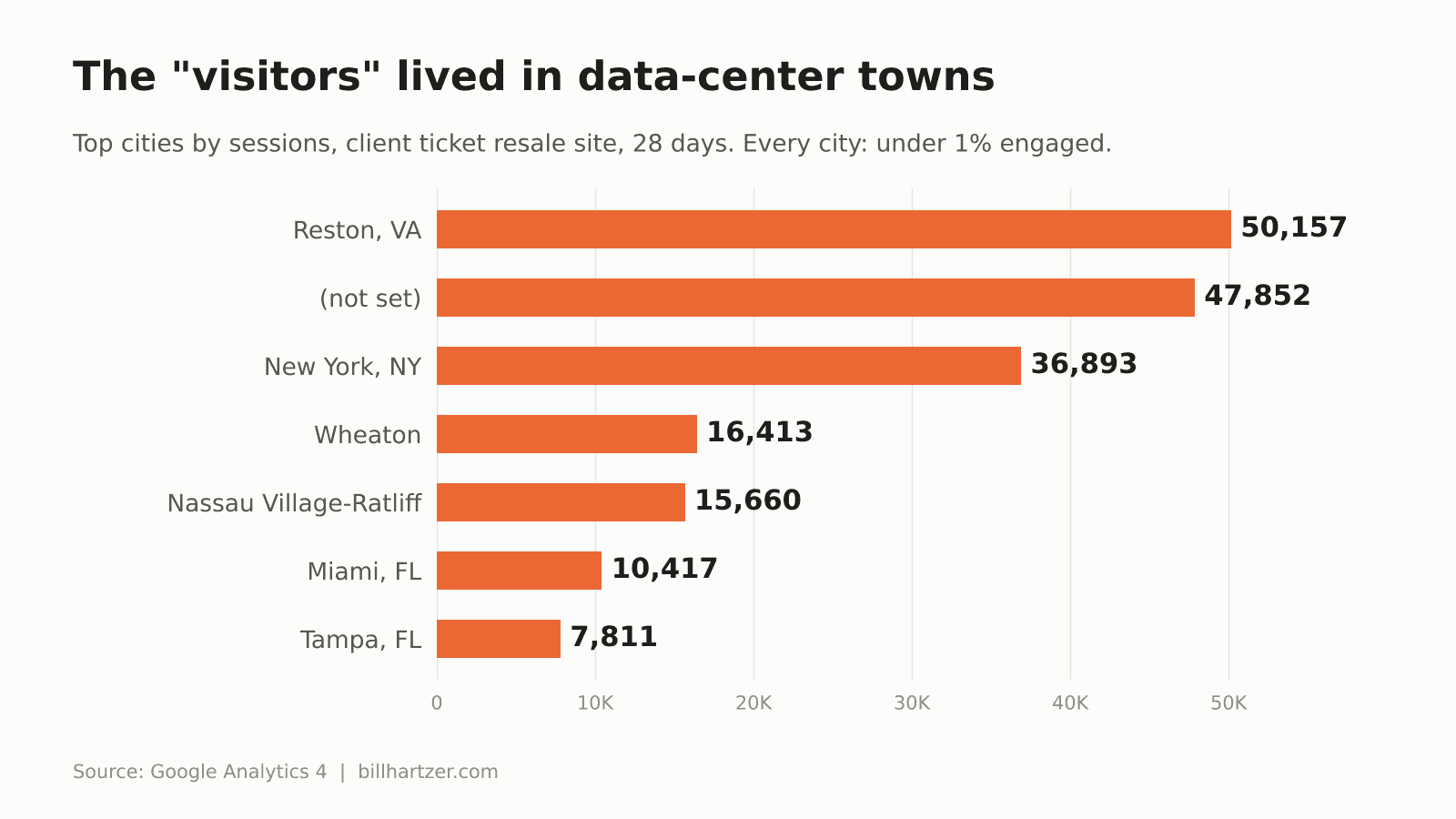
Dana’s first stopgap was routing every visitor with an Asian time zone to the test property. That would have done nothing for me. These bots were in American data centers. On the client site, the busiest “city” was Reston, Virginia, in the same Northern Virginia corridor where Amazon Web Services runs its largest region, followed by Wheaton, Nassau Village-Ratliff, New York and Miami, all with the same zero-engagement pattern. Location rules would have missed nearly all of it.
The code only fixes tomorrow
A graphics card check runs in the visitor’s browser. It cannot reach back and relabel last month’s sessions. I needed the reports to be usable that night, which meant a second fix built from data GA4 already had.
What the Bot Traffic Looked Like
Before changing anything, I built a free-form Exploration in GA4 with screen resolution, operating system, country and city as dimensions, and sessions, engaged sessions and views per session as metrics. The pattern showed up in the first table.
Square screens nobody owns
On Good Seats, 139,159 sessions came from a 1280×1200 screen on Windows. Another 72,593 came from 1366×1366 on a Mac. A further 152 came from 1600×1600. Real people do not buy square monitors. Dana saw the same thing: bots reporting windows that exactly match the screen at odd sizes like 1600×1600 and 1280×1200, because nobody is sitting in front of them with a toolbar and a taskbar eating up space.
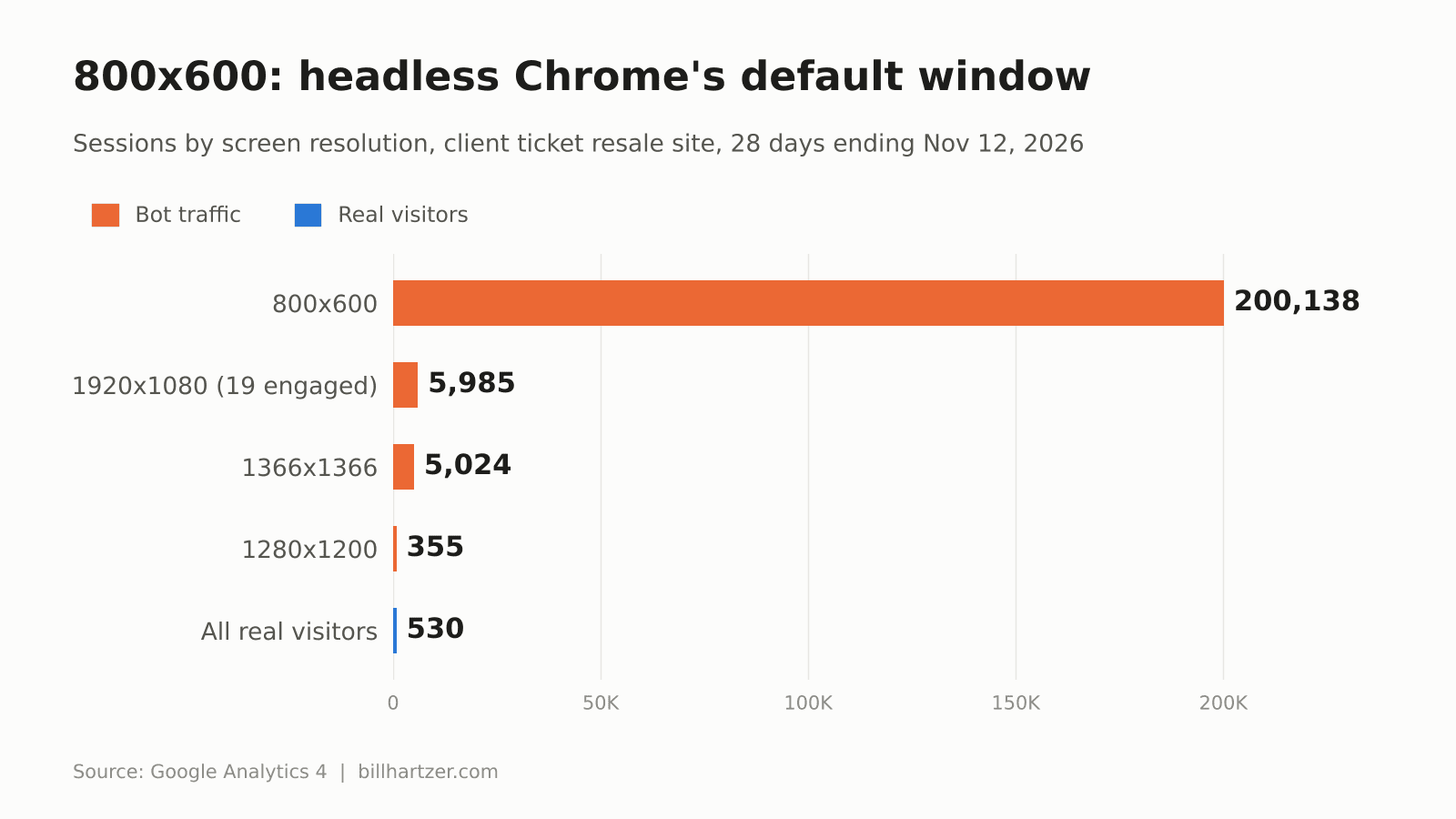
On the client site, the giveaway was 800×600, which is headless Chrome’s default window size. About 200,000 of 214,509 sessions in 28 days reported it.
Data-center cities
Northern Virginia is where a large share of the cloud lives. A spike of “visitors” from a single Virginia suburb, all with the same screen size, is not a regional marketing win. If you see it, check whether those sessions share one screen resolution.
One page and zero engagement
Across both sites, the bot sessions averaged about one page view and about one second of engagement. On Good Seats, the 1366×1366 group logged 72,593 sessions and 2 engaged sessions. The real visitors looked like real visitors: phones at 440×956, 402×874 and 393×852, more than one page per session and 20 to 40 seconds on the site.
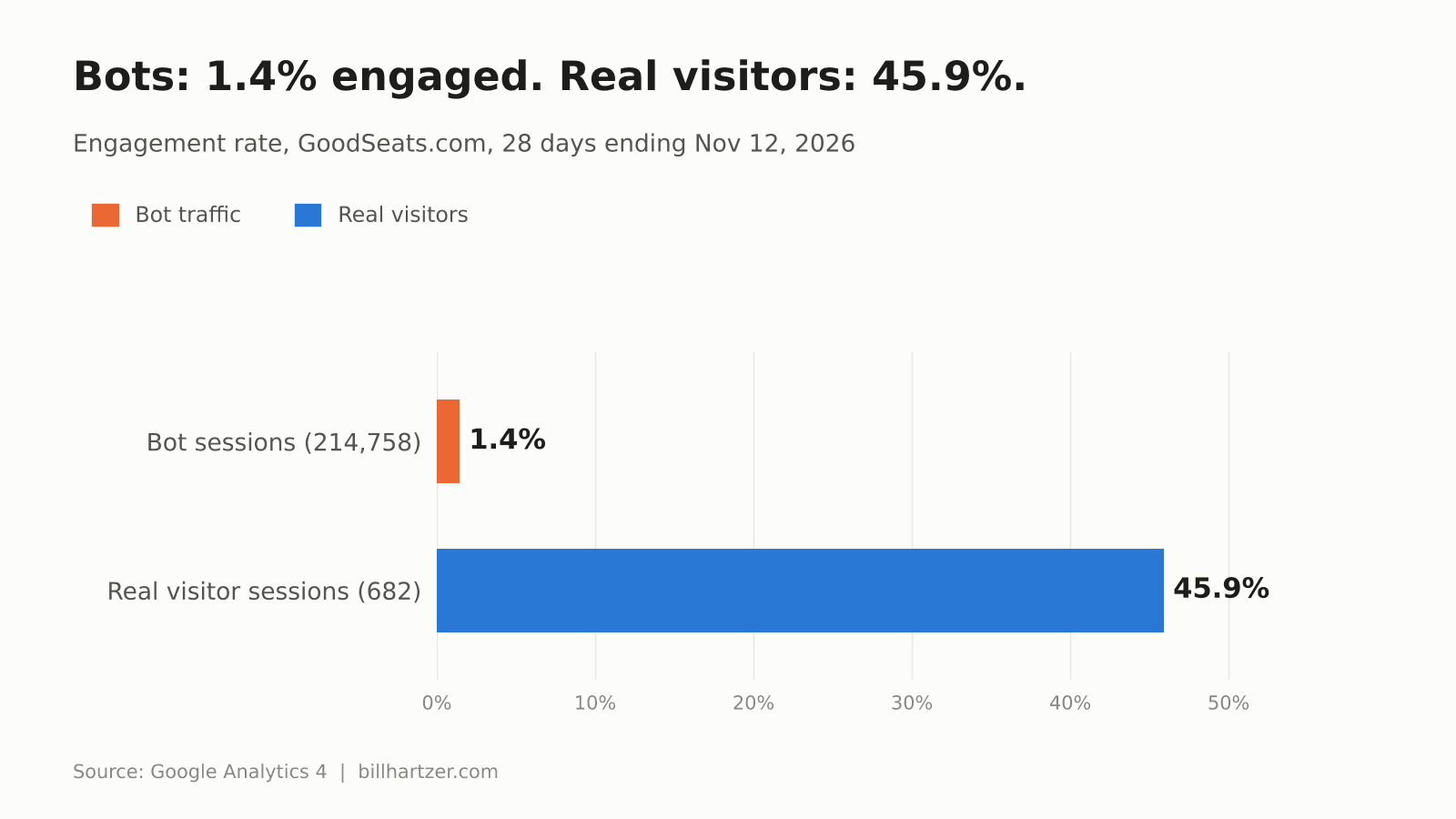
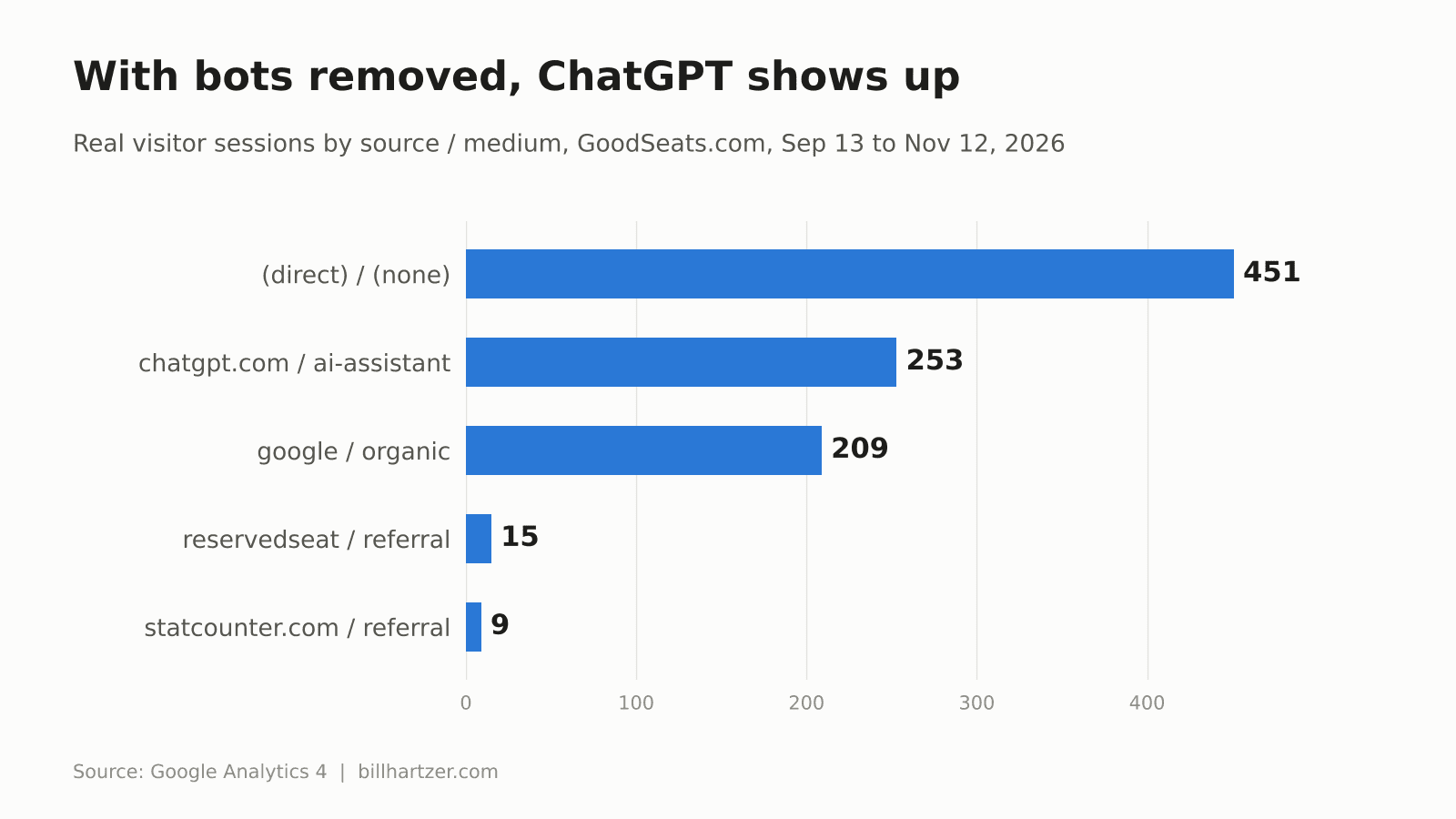
Once the bots came out, the sources made sense again. On Good Seats, ChatGPT and Google organic search turned out to be the two biggest named sources of real visitors, with both tracked purchases intact. Before the cleanup, those sources were invisible under 200,000 fake direct sessions.
The Two-Part Fix
Part one: clean the reports you already have
GA4 segments work inside Explorations, the free-form reports under the Explore menu. I built a session segment called “Humans only (bot screen sizes excluded)” and saved it to each property so it can be reused in any Exploration.
The segment keeps a session if its screen resolution does not match this regular expression:
^(800×600|1366×1366|1280×1200|1280×1600|1600×1600)$
It also keeps any session that contains a purchase event, no matter what screen it came from. That second rule is the safety net. A bot will not complete a real checkout with a real card, so a purchase is the one signal that a session was human. If some buyer somewhere owns a square monitor, their order still shows up in your sales report.
On the client site, I added a second condition group for 1920×1080 and 1440×900, which were also overwhelmingly bots there. That screen size needs care. 1920×1080 is the most common real desktop resolution there is, so exclude it only when your own data shows it full of zero-engagement sessions, and keep the purchase rule attached.
Then I applied the segment to every Exploration that reports on sources and sales. Your numbers will be different from mine. Build the screen resolution table first and let your own data tell you which sizes to exclude.
Part two: label bots at the source
The permanent fix runs in the browser on every page that loads GA4. In plain terms, the code does five things:
- It creates a tiny invisible canvas and asks WebGL which graphics renderer it is using.
- It labels the visit physical_gpu, virtual_gpu or gpu_not_found.
- It saves the answer for the rest of the visit, so the check runs once and not on every page.
- It tells GA4 to attach that label to every event as the bot_check parameter.
- It adds traffic_type “bot” only for virtual_gpu visits.
The label has to be set before the GA4 configuration line runs, or the first page view goes out unlabeled. On Good Seats that meant changing it in two places, because GA4 loads once from the site’s main script and again inside the seating map frame on every event page. If your site loads the GA4 tag in more than one spot, every spot needs it.
Inside GA4, two settings make the label useful:
- A custom dimension: “Bot check,” event scope, reading the bot_check parameter, so bot versus human becomes a column you can add to any report.
- A data filter: an Internal Traffic filter that excludes events where traffic_type equals “bot,” created in Testing state.
Testing state is the part people skip, and they should not. Google’s documentation says a filter in Testing state only tags matching events with a “Test data filter name” dimension. Nothing is removed. An Active filter is a different animal. Google’s data filter documentation is blunt that excluded data is never processed and never comes back, not in GA4 and not in BigQuery. Let the filter run in Testing for a week or two. Compare the Bot check values against screen size and engagement. Then switch it to Active.
Mistakes I Made So You Do Not Have To
Some of the settings that look obvious turned out to be wrong. These cost me the most time.
The engagement event does not prove a human
My first attempt kept 1920×1080 sessions if they fired GA4’s user_engagement event. The segment ballooned from about 500 sessions to 3,500. Bots fire that event too. None of the engagement or browsing events I tried separated the two groups. Only the purchase event did.
Some sites fire checkout events on page load
The client site sends a begin_checkout event the moment a ticket listing page opens. Bots open those pages too. So “kept anyone who started a checkout” let thousands of bots back in. Check when your key events actually fire before you trust them as a human signal.
Filter names are picky
GA4 rejected my first data filter name because it had parentheses in it. Data filter names can only use letters, numbers, spaces and underscores, up to 40 characters, and each property gets at most 10 data filters.
Two months of history is all you get by default
When I tried to widen an Exploration to 90 days, GA4 cut it off at about two months. Event data retention was set to the default of 2 months. I changed it to 14 months under Admin, Data collection and modification, Data retention. The change only applies from that day forward, so make it before you need the history, not after.
What Chrome Is Changing Under This Method
This check has an expiration date, and Dana flags it herself. The Chrome team has been working to remove the automatic SwiftShader fallback since Chrome 130, citing security risks in the software path. Chrome’s own figure puts SwiftShader at about 2.7 percent of all WebGL contexts.
The Chrome engineers on that thread have described testing three changes: removing SwiftShader on Mac and Linux, swapping in Microsoft’s WARP software renderer on Windows, and ending the fallback to software rendering after GPU crashes. When that lands, a headless browser on a server will not report SwiftShader anymore. It will either report no WebGL at all, which lands in gpu_not_found, or report WARP, which shows up as “Microsoft Basic Render Driver.”
Two things follow from that. First, watch the gpu_not_found bucket. If it starts filling with zero-engagement sessions at bot screen sizes, extend the bot rule to cover it. Second, run the check with the actual renderer name logged for a stretch, so you see what your bots report and are not guessing.
What This Will Not Fix
Be clear-eyed about the limits.
- Ghost spam: fake hits sent straight to your measurement ID never load your site, so they never run your code.
- Non-JavaScript crawlers: scrapers that never execute JavaScript never trigger GA4 in the first place.
- Server load: labeling bots in analytics does not stop them from hitting your server. Blocking is a separate decision for Cloudflare or your firewall.
- Hidden AI referrals: real visitors from ChatGPT and other AI tools often still land in direct.
That last one is worth a second look. I wrote earlier this year about data showing AI-referred visitors sign up at 11 times the rate of search traffic, and that most analytics setups file them as direct. Bot traffic makes that problem worse, because a few hundred real AI visitors disappear under a pile of fake direct sessions. Strip out the bots and the real AI search traffic finally becomes visible. On Good Seats, it was the top named source.
The bots themselves are not going away either. Akamai’s figures, which I covered in AI bots are draining publishers, faking users and wrecking analytics, showed AI bot traffic up 300 percent in a year. The old fix for junk traffic was a referral filter, the kind I described years ago in how to filter referrer spam in Google Analytics. Referral filters do nothing here. These bots arrive as direct traffic and look like Chrome.
Let Claude Do the GA4 Setup For You
Most of this work is clicking through GA4 screens: building the Exploration, reading the screen resolution table, writing the segment, applying it to every report, registering the custom dimension, creating the data filter, checking data retention. It took me an evening across two properties, and much of that time went to the mistakes above.
I turned the whole process into an instruction file written for Claude, Anthropic’s AI assistant. If Claude has access to your browser with Google Analytics signed in, you give it the file and your property name. It logs into GA4, profiles your bot traffic, builds the segment from your own screen sizes, applies it to your Explorations, registers the Bot check dimension, sets up the data filter in Testing state and checks your data retention setting. It also writes a site-specific code document for whoever maintains your website, so the browser-side check gets installed correctly.
It is generic. It works on any site running GA4, with or without Tag Manager. If you want a copy, get in touch with me and I will send it to you.
Dana DiTomaso did the hard part here: she tested twelve signals and found the one that holds up. My contribution is adapting it for sites without Tag Manager, keeping everything in one property, and cleaning up the reports you already have so you do not wait two weeks to see real numbers.
Start with the screen resolution report. If a handful of odd sizes own most of your sessions, your analytics has been describing robots, and every decision you made from it deserves a second look.