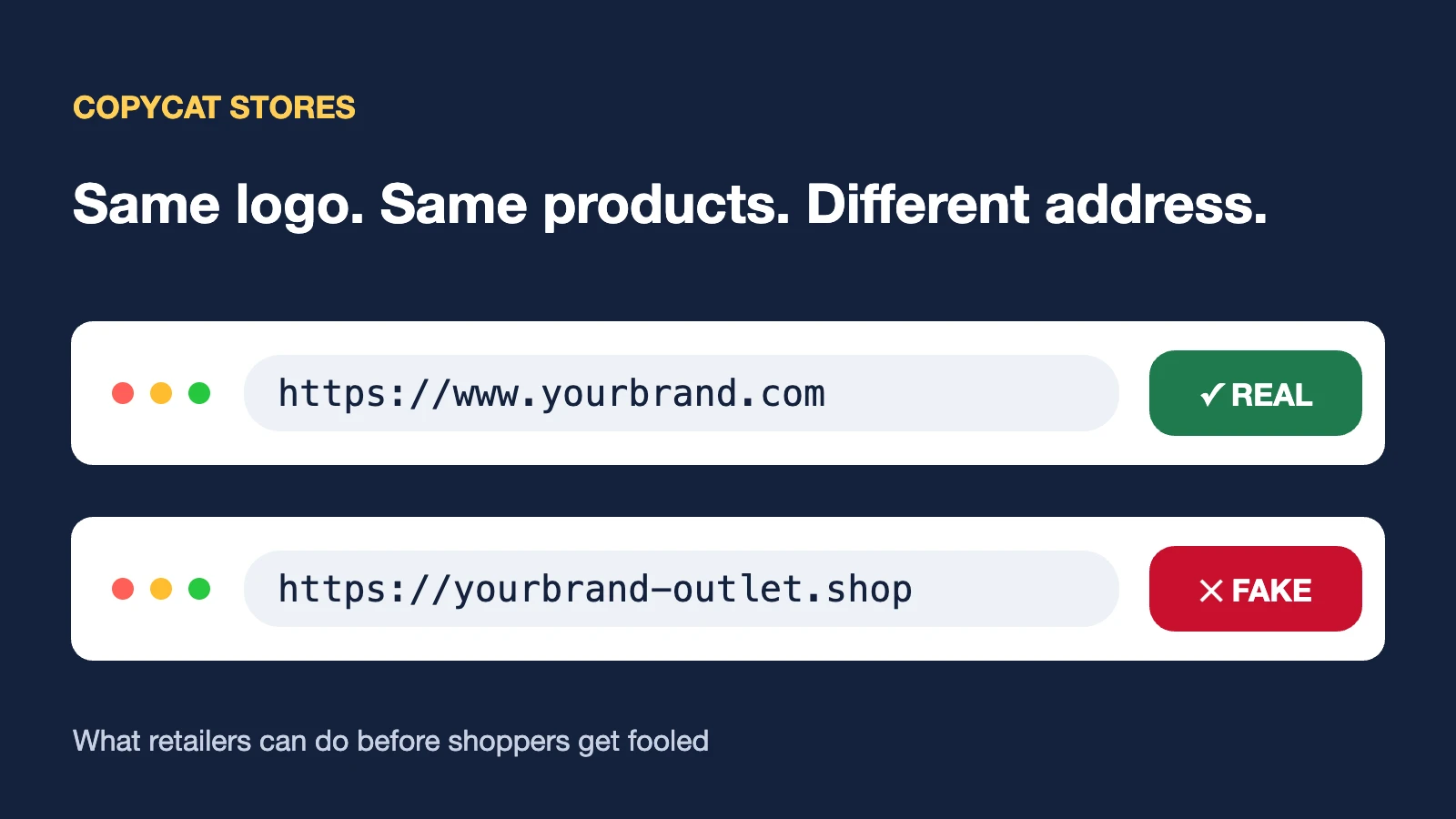
Researchers have tied nearly 119,000 fake shopping domains to one copycat cluster called DoppelCart, and those stores mimic more than 44,000 real brands, according to Malwarebytes’ summary of research by the German security firm Nebty. The fake shops copy product catalogs, photos and branding from real retailers, then steal card numbers and bank confirmation codes at a checkout page that looks like yours.
Most of the advice this week is aimed at shoppers. Check the web address. Read the reviews. Pause before you click. All of it is sound, and all of it puts the job of spotting the fake on the person least equipped to do it. When a customer gets fooled by a clone of your store, you inherit the angry emails, the chargeback questions, the one-star reviews and the lost trust. The copycat used your name. The customer blames your name.
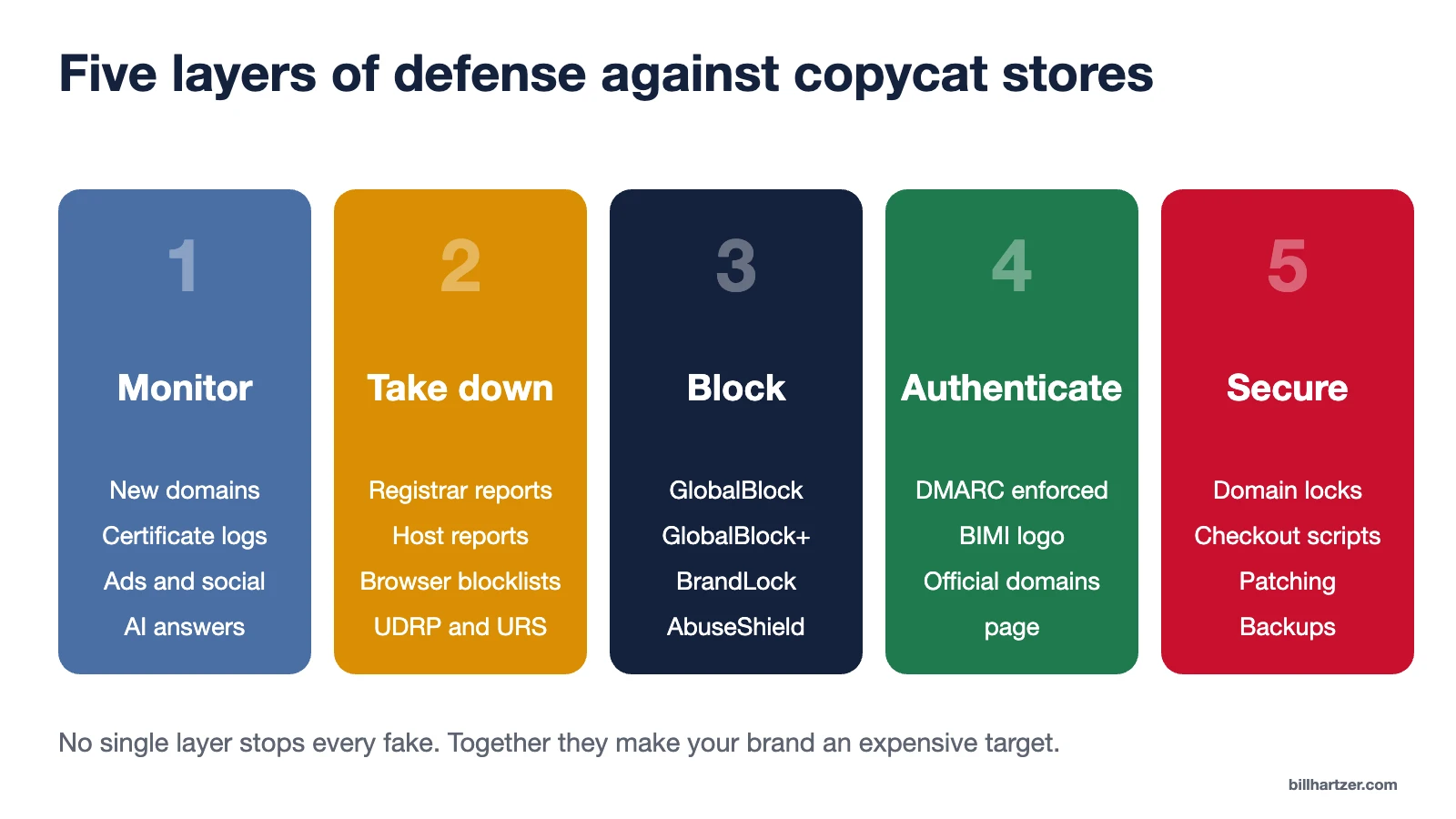
So the retailer has to move first. That means watching for look-alike domains, getting fakes taken down fast, blocking your brand from being registered in hundreds of domain extensions, and locking down your own site and checkout so it cannot be turned against your customers. In my domain recovery and brand protection work, the companies that get hurt worst are rarely the ones with the weakest technology. They are the ones who assumed someone else, the registrar, the platform or the shopper, was watching.
Why Copycat Stores Are a Retailer’s Problem
The scale changed in 2026. Nebty calls DoppelCart the largest publicly documented fake-shop network by domain count, and Recorded Future later put the cluster at about 261,700 suspected domains, with roughly 40% of the sites it observed still active. Nebty found 118,787 of the original domains in a single extension, .shop. The fake shops advertised discounts of up to 65%. Malwarebytes reports that some of them load product images directly from the real retailers’ servers.
Read that last detail again. Some of these clones are using your bandwidth to show your product photos to the people they are robbing.
DoppelCart is not alone. Malwarebytes separately mapped more than 20,000 fake-shop domains sitting on just 36 IP addresses, running identical storefronts with different names pasted on top. These are not hobbyists. They are businesses with templates, ad budgets and payment processing.
The money is real on both sides. Adobe expects U.S. online holiday sales to reach a record $275.1 billion this season, with $47.5 billion of it during Cyber Week alone. On the loss side, the FBI’s 2025 Internet Crime Report recorded $503 million in non-payment and non-delivery losses and nearly 192,000 phishing and spoofing complaints, out of $20.877 billion in total reported losses.
The Advice That Leaves Retailers Out
The news peg for this article is a holiday shopping release from F-Secure, which is promoting a new consumer app called Kiren. F-Secure’s Dr. Megan Squire, Principal Threat Intelligence Researcher, makes a point every retailer should hear:
“The good fakes look exactly like the real thing, right up until you check one small detail they couldn’t fake: like the actual web address, or a review history with real human reviews, or a return policy that actually exists.”
She is right. But look at who does the checking in that sentence. The shopper. F-Secure also cites its own survey finding that 71% of U.S. consumers shop online at least once a week. The release does not give the survey’s sample size or fielding dates, and its purpose is to sell a consumer app, so treat the number as a vendor figure.
The retailer’s version of Squire’s point is more useful. If the web address is the one detail scammers cannot fake, then the web address is the thing you have to protect, monitor and make easy to verify.
What a Fake Store Costs the Real One
A customer who buys from a clone of your store does not file a complaint against an anonymous .shop domain. They search for your brand, find your real contact page and ask where their order is. Then they post about it.
The costs land in places most retailers do not track as fraud:
- Support time spent answering customers who never bought from you
- Reviews and social posts that attach the scam to your brand name
- Paid search budget lost to impersonators bidding on your brand
- Email engagement that drops when customers stop trusting messages with your name on them
- Returning customers who quietly decide to buy the same product from a marketplace instead
None of those show up as a chargeback on your merchant account. All of them show up in revenue.
Monitor Your Brand Before Your Customers Find the Fakes
You cannot take down what you have not found. Brand monitoring is the unglamorous part of this work, and it is the part that decides whether you hear about a copycat from your own alerting or from a furious customer.
Watch New Domain Registrations
Copycat stores need a domain name. That is their weak point. Most brand monitoring services, and several registrars that serve corporate clients, will alert you when a new domain is registered that contains your brand or a close variation of it. What you want covered:
- Typos of your brand, such as a doubled letter or a dropped letter
- Homoglyphs, which are look-alike characters from other alphabets, such as a Cyrillic “?” in place of a Latin “a”
- Your brand plus a sales word, such as outlet, sale, deals, blackfriday, clearance or official
- Your brand in cheap, high-abuse extensions such as .shop, .top, .online and .store
- Your brand plus a support or account word, such as login, pay, account, help or support
The last group matters more than retailers think. A clone of your storefront steals one order. A fake “login-yourbrand” page steals the customer’s account, their saved cards and their order history.
Check Certificate Transparency Logs
Every SSL certificate (the certificate behind the padlock in the browser) issued by a public certificate authority is recorded in public Certificate Transparency logs. Fake stores need certificates too, because browsers warn shoppers away from sites without them. Searching those logs for your brand name, using a free tool such as crt.sh or a commercial monitoring service, often surfaces a copycat domain within hours of the site going live, sometimes before it has been promoted anywhere.
Look at Your Own Server Logs
Here is a monitoring source almost nobody uses. If a clone is loading images from your server, your server knows about it. Your web server logs and your CDN (content delivery network) reports record the referring site for image requests. Filter for image requests whose referrer is not your own domain, a search engine or a known partner. A new domain showing up there, pulling dozens of your product photos, deserves a closer look today.
If you use a CDN such as Cloudflare, hotlink protection can stop other sites from loading your images at all. That will not shut the clone down. It will make the clone look broken, which is a fine outcome.
Watch Search Ads and Search Results
Impersonators buy ads on your brand name. Search Engine Land has documented how scammers copy a brand’s domain and ad copy to win ad placements on brand searches, and because Google serves one ad per domain in a given auction, a scammer who wins the slot can push the legitimate brand’s ad aside. In paid search audits I have seen brands that never once searched their own name on a phone during a sale weekend. Do it. Do it on the busiest days, from more than one location, and screenshot what you find.
Organic results need the same attention. I have written about a reverse-proxy attack in which a cloned site replaced the real one as Google’s canonical URL. If Google Search Console starts showing another domain as the canonical for your pages, or your traffic drops and a copy of your site appears for your own product names, treat it as an impersonation problem, not just an SEO (Search Engine Optimization) problem.
Watch Social Ads and Marketplaces
Social media ads are where most fake-shop traffic starts. The National Retail Federation has published an issue brief on fake ads on Facebook and Instagram that impersonate legitimate retailers and send users to fraudulent sites. Meta’s Brand Rights Protection tool lets verified rights holders monitor and report impersonation across ads, posts, pages and shops, and Meta has said enrolled businesses can now report suspected scam ads even when an ad does not use their brand directly. If you sell under a registered trademark and you have not enrolled, enroll before the next sale event, not during it.
Check What AI Assistants Say About You
Shoppers now ask ChatGPT, Gemini and Perplexity where to buy things. Netcraft researchers ran questions about 50 popular brands through chatbots, got 131 web addresses back, and found some of those answers pointing to sites the brands did not control, as I covered in How AI Is Fueling a New Wave of Cybercrime. Ask the major assistants for your store’s website, your customer service page and your login page. If an answer points somewhere you do not own, document it and report it.
Take Down What You Find
Finding a fake is half the job. Getting it offline before the weekend is the other half, and speed matters more than perfection.
Report to the Registrar and the Host
Every domain has a registrar, and every live site has a host. Both have abuse contacts. Since April 2024, ICANN (the Internet Corporation for Assigned Names and Numbers) has required registrars and generic top-level domain registries to take action on actionable reports of DNS abuse, and phishing is one of the listed abuse types. ICANN reports that between April 2024 and August 2026 it opened more than 650 investigations into registrars and registries under those rules, issued eight breach notices and terminated one registrar’s accreditation.
That changes the math on an abuse report. A well-documented phishing report is no longer a polite request. It is a contractual obligation the registrar has to answer to ICANN for. A copycat store that collects card numbers on a fake checkout page is phishing. Say so, plainly, in the report.
What makes a report actionable:
- The exact URLs of the fake pages, plus the domain
- Screenshots that show your branding, the copied products and the checkout form
- The date and time you observed the site
- Proof that you own the brand, such as a trademark registration number
- A one-sentence statement of the harm, such as “this site impersonates our store and collects payment card data”
Report to the Browser Blocklists
Report the URL to Google Safe Browsing and Microsoft’s reporting form. When a site is added to those lists, Chrome, Edge and other browsers show a full-page warning before a shopper reaches it. That warning protects customers during the hours the registrar is still deciding what to do with the domain.
Use UDRP or URS When You Want the Domain
Sometimes you want the domain itself, not just a dead site. The UDRP (Uniform Domain-Name Dispute-Resolution Policy) lets a trademark owner ask a panel to transfer a domain registered and used in bad faith. At WIPO, the largest UDRP provider, a single-panelist case covering one to five domains costs $1,500, and WIPO now offers expedited processing for $4,000 with a decision within a month. The URS (Uniform Rapid Suspension) process is cheaper and faster but only suspends the domain. It does not hand it over to you.
I have worked on enough of these cases to say this plainly: a UDRP is a cleanup tool, not a prevention plan. For more on how domains get lost and recovered, see my coverage of domain hijacking and recovery.
Keep an Evidence File
Every takedown, every UDRP filing and every conversation with a payment processor goes faster with good records. Keep a shared folder with screenshots, WHOIS lookups, server log extracts, ad screenshots and customer complaints, each one dated. If the matter ever ends up in litigation, that file is the first thing an attorney will ask for.
Block the Domains Before They Are Registered: GlobalBlock and NameBlock
Monitoring and takedowns react to a problem that already exists. Domain blocking stops some of those domains from existing in the first place.
How Domain Blocking Works
A domain block withholds a name from registration. Nobody owns the blocked domain, including you, so it cannot host a website, send email or redirect traffic. When someone searches for that domain at a registrar, it simply shows as unavailable. For a retailer, that is the point: a scammer cannot build a fake store on a name that cannot be registered.
Blocking is far cheaper than defensive registration. Registering your brand in several hundred extensions would cost tens of thousands of dollars a year and leave you managing hundreds of domains you never use. One block covers the same ground in a single order.
GlobalBlock and GlobalBlock+
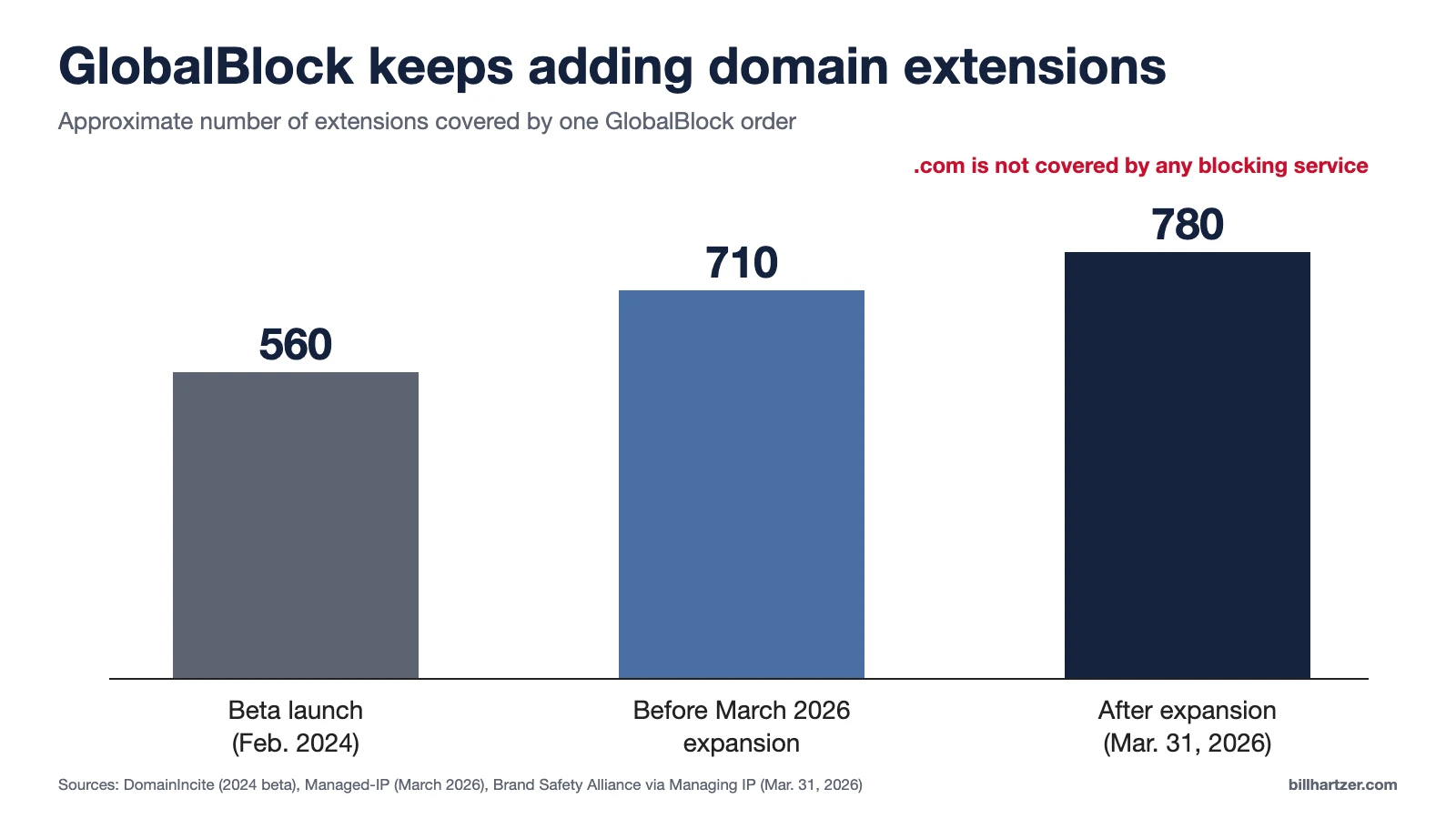
GlobalBlock comes from the Brand Safety Alliance, a GoDaddy Registry initiative that launched the service in 2024, with GoDaddy Registry as the technical back end. It blocks exact matches of a brand across every participating registry in one transaction. In March 2026 the Brand Safety Alliance announced coverage of 780 extensions after adding .cn and .de, up from about 560 when the service entered beta in 2024.
The two tiers do different jobs:
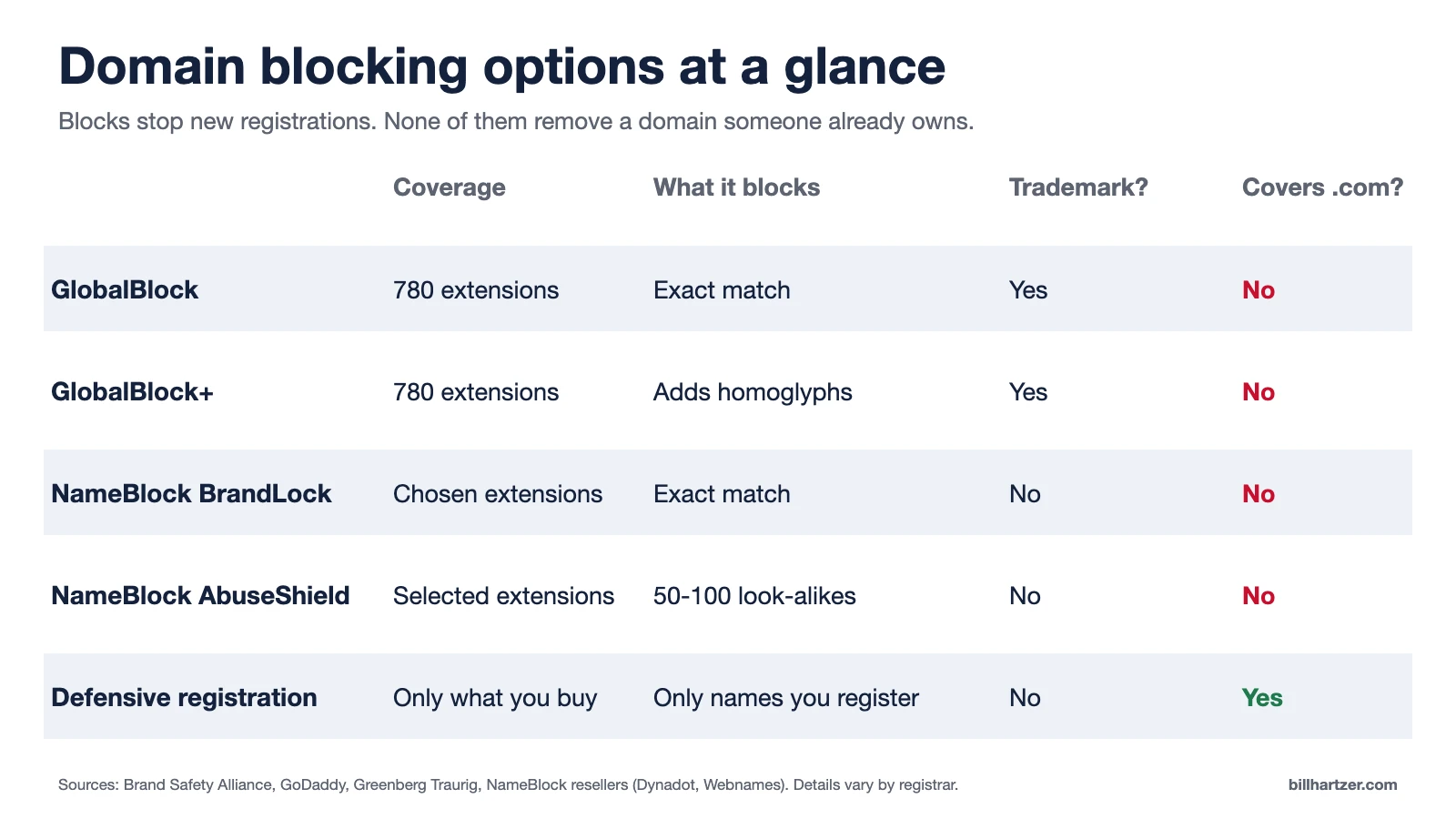
- GlobalBlock blocks exact matches of your mark, including names a registry has marked as premium.
- GlobalBlock+ adds homoglyph variants of your mark, the look-alike characters scammers use to fool the eye, and lets you block more labels.
Two features matter for retailers. First, the block picks up names automatically when they expire or are deleted; the Brand Safety Alliance says this feature has already recovered more than 10,000 domains from third parties. Second, new extensions join the block at no extra charge as registries sign on.
The limits matter just as much. GlobalBlock requires verified trademark rights. It does not touch domains that are already registered, by you or by anyone else. And as of today, .com is not covered by GlobalBlock or by any other blocking service, so your monitoring still has to watch the most popular extension of all. Pricing varies by registrar. Greenberg Traurig reported in 2024 that most corporate registrars charged around $5,600 a year for GlobalBlock and $8,200 for GlobalBlock+ per trademark, and 101domain currently lists GlobalBlock+ starting at $9,799 a year.
NameBlock: AbuseShield, BrandLock and Trademark Blocking
NameBlock takes a different approach. It sells blocks extension by extension, through participating registries, and two of its products matter most for retailers.
BrandLock blocks exact matches of a brand name in the extensions you choose. AbuseShield goes after the variants scammers actually register. According to Dynadot’s AbuseShield help page, it uses a machine learning model to block roughly 50 to 100 look-alike domains for a protected name, including typos, homoglyphs and keyword variants such as “pay-” and “login-” in front of the brand. Its covered extensions include .info, .live, .pro, .icu, .buzz and .sbs.
AbuseShield’s biggest advantage for small retailers is eligibility. It works from a registered domain name, so a business without a registered trademark can still use it. In December 2025 NameBlock added trademark blocking tiers, sold through corporate registrars, that cover 18 extensions and add homoglyphs and “brand plus extra word” variants at the higher levels.
What Blocking Will Not Do
Blocking is one layer. It will not remove a copycat domain that is already registered. It will not cover .com. It will not stop a scammer who builds a fake store on a domain that has nothing to do with your name, such as a generic “best-deals” domain with your logo on the page.
The number of extensions is also about to grow again. ICANN confirmed 1,616 paid applications in its 2026 round of new generic top-level domains. Not all will launch, but every new extension that does is another place your brand can be registered by someone else. Blocking services that add new registries automatically will absorb some of that growth. Monitoring has to absorb the rest.
My Read on Blocking
Here is the approach I recommend to retailers. Register the domains you actually use, plus the obvious typos of your main .com. Block the long tail with GlobalBlock if you hold a registered trademark, and add AbuseShield for the look-alike variants in the extensions scammers favor. Then lock down everything you own. Blocking without monitoring leaves you blind to .com. Monitoring without blocking means paying to fight the same domains over and over.
A disclosure: my company DNAccess resells both NameBlock and GlobalBlock. I recommended these services to clients before I sold them, and the advice above is the same advice I give people who buy nothing from me.
Make Your Real Messages Easy to Verify
A fake store gets traffic from fake ads, fake texts and fake emails. You cannot stop scammers from sending messages. You can make it obvious which messages are really from you.
Get DMARC to Enforcement, Then Add BIMI
DMARC (Domain-based Message Authentication, Reporting and Conformance) tells receiving mail servers what to do with mail that claims to come from your domain but fails authentication checks. At a policy of “quarantine” or “reject,” spoofed mail using your exact domain stops reaching inboxes. At a policy of “none,” it does nothing but send you reports.
Valimail’s 2026 research found that online retail leads every sector in DMARC adoption but has a wide enforcement gap: many retailers set a monitoring-only policy to satisfy Google and Yahoo’s sender requirements and never moved further. That is a record that looks protected and is not. Check yours. If it says p=none, schedule the move to enforcement after the holiday rush, when a misconfigured sender cannot cost you Cyber Monday email.
Once you reach enforcement, BIMI (Brand Indicators for Message Identification) lets supported inboxes display your verified logo next to your messages. Customers learn to look for it, and fakes cannot copy it.
Publish One Source of Truth
Create a single page on your site that lists:
- Every domain you actually use for your store, email and customer accounts
- Your official social media accounts and marketplace storefronts
- How you contact customers, and what you will never ask for by text or email
- How customers can report a suspected fake store or message to you
Link that page from your footer and your order confirmation emails. When a customer is unsure, give them one place to check that is not a search result a scammer can buy.
Stop Teaching Customers to Trust Strange Domains
This is where I part company with a lot of marketing teams. Many retailers send email from one domain, run promotions on a second, process returns on a third and send tracking links through a fourth. Every one of those trains customers to accept an unfamiliar domain with your brand in it. That is exactly the habit a copycat store depends on. Keep customer-facing traffic on your main domain and its subdomains wherever you can. Consistency is a security control.
Protect Your Own Site and Checkout
Everything above defends against fakes. This section is about the other half of the threat: attackers who skip the copycat and take over the real store. For website owners and brand owners without an ecommerce cart, most of it still applies.
Lock Down the Domain Itself
Your domain name is the control point for your site, your email and your checkout. If someone takes it, they do not need a clone. They have the original. I have helped recover hundreds of stolen domains, and the same failures come up again and again. My checklist, from 7 Ways to Protect Your Domain Name and my later posts:
- List the business, not a developer or agency, as the domain registrant
- Turn on multi-factor authentication at the registrar and the DNS provider
- Turn on registry lock for your main domains, which requires manual verification before changes
- Renew your main domains for several years at a time
- Use a registrar contact email that is not on the domain it protects
- Keep your registrar and your web host at separate companies, so one breach cannot take both
Control the Scripts on Your Payment Page
E-skimming, often called Magecart after the groups that made it famous, injects malicious JavaScript into a real store’s checkout page. The page looks and works normally. The card data goes to the attacker as the customer types it. No copycat domain is involved, and the customer has no way to detect it.
PCI DSS (the Payment Card Industry Data Security Standard) now addresses this directly. Requirements 6.4.3 and 11.6.1 became mandatory on March 31, 2025. The PCI Security Standards Council published guidance on payment page security and preventing e-skimming that explains what they require in practice:
- An inventory of every script that runs on the payment page, with a written reason for each
- A method to confirm each script is authorized and has not been altered
- A mechanism that detects unauthorized changes to the page and its security headers and alerts you
The fastest way to shrink this problem is to shrink the payment page. A hosted payment form or payment iframe from your processor keeps card entry off your servers. If your checkout carries chat widgets, heatmap tools, A/B testing code and three ad pixels, every one of them is a script that has to be justified.
The attacks are not theoretical. This year Sansec, which tracks ecommerce skimming, reported a skimmer hidden in invisible SVG elements on 99 Magento stores, and a flaw in the Funnel Builder plugin, used by more than 40,000 WooCommerce stores, being exploited to skim checkouts.
Patch on a Schedule, Then Verify
Most store compromises start with software that was out of date. Daniel Sloof, lead security researcher at Sansec, told BankInfoSecurity that the vast majority of breaches are caused by unpatched platform code or vulnerable third-party extensions. Update your platform, theme and plugins on a schedule. Remove plugins you no longer use. Then check that the update actually closed the hole, because a site that was compromised before you patched can stay compromised after.
I clean up hacked WordPress sites for clients, and the owners are almost always the last to know. The FBI recently flagged more than 1,000 hacked WordPress sites in a ransomware operation, which I covered in The FBI Just Put SEO in a Ransomware Alert. Your site can be the victim and the delivery truck at the same time.
Stop Card Testing and Account Takeover
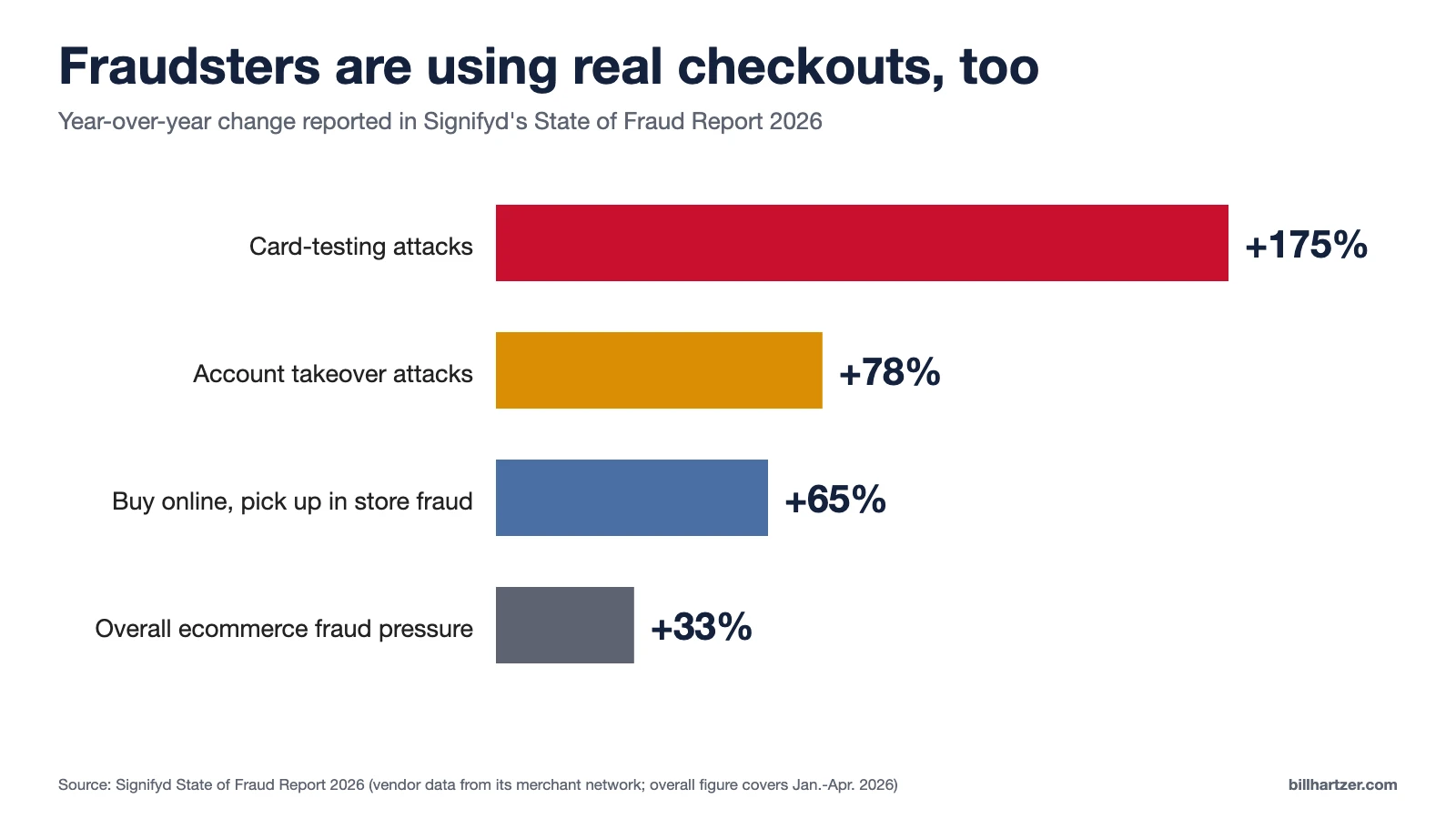
Fraudsters use real checkout pages to test stolen cards, running small transactions at volume to find the cards that still work. Signifyd’s State of Fraud Report 2026 found card-testing attacks up 175% and account takeover attacks up 78%, drawn from transactions across its merchant network. Signifyd sells fraud protection, so read those figures as a vendor’s measurement of its own customers, but the direction matches what payment processors are telling merchants.
The defenses are well known and worth checking before the weekend:
- Turn on your payment processor’s card-testing and velocity rules
- Rate-limit failed payment attempts by IP address, device and email
- Add bot protection to checkout, login and account creation
- Offer multi-factor authentication or passkeys on customer accounts
- Alert customers by email when their password, address or saved card changes
Keep Backups You Have Actually Restored
A backup you have never restored is a hope, not a plan. Keep at least three copies of your site and database, on two kinds of storage, with one copy offsite and out of reach of your hosting account. Test a full restore at least once a quarter, and before every major sale.
I say that as someone who spent part of this week repairing a corrupted WordPress database on my own site. The site stayed up. The admin panel did not. The repair worked, but if it had not, a tested backup would have been the only way back. That is the moment you find out whether yours works.
Monitor Uptime, DNS and File Changes
Set up alerts for three things: your site going down, your DNS records changing and files changing on your server. A DNS change you did not make can mean a hijacked domain. A new file in a theme folder can mean a skimmer. Neither should be discovered by a customer.
A Cyber Week Checklist for Retailers and Site Owners
If you do nothing else before the weekend, do these:
- Search your brand on a phone in Google, Bing, Facebook and Instagram, and screenshot any impersonators
- Search Certificate Transparency logs for new certificates containing your brand
- Check server and CDN logs for other sites loading your product images
- Confirm your DMARC policy and note whether it is enforced
- Confirm multi-factor authentication and registrar lock on every domain you own
- Review the scripts on your checkout page and remove any you cannot explain
- Turn on card-testing and velocity rules with your payment processor
- Confirm your last backup completed and that you know how to restore it
- Publish or update your page listing official domains and contact methods
- Price out GlobalBlock and AbuseShield for your brand before the next sale event
F-Secure is right that a fake store eventually fails on a small detail it cannot fake. Retailers control most of those details: the domain, the certificate, the email authentication, the checkout code and the record of what is real. Shoppers should still slow down and check the address bar. They should not be the only ones checking.
The copycat networks are betting that brands will leave the watching to someone else. The retailers who win this season will be the ones who decided the watching was their job.