• About
    • History of Dallas SEO
  • Contact
  • Topics
    • Bing
    • Blogging
    • Branding
    • Domain Names
    • Google
    • Internet Marketing
    • Link Building
    • Local Search
    • Marketing
    • Public Relations
    • Reputation Management
    • Search Engine Marketing
    • Search Engine Optimization
    • Search Engines
    • Social Media
  • Tech
  • Advertise
  • Services
    • Search Engine Optimization
    • Ongoing SEO Services
    • SEO Expert Witness
    • Google Penalty Recovery
    • Mini SEO Audit
    • Link Audit
    • Keyword Research
    • Combine Websites SEO Services
    • PPC Management
    • Online Reputation Management
    • Domain Name Consultant
    • Domain Names & Expired Domains
    • Domain Name Appraisal

Bill Hartzer

GoDaddy Airo: Register your .com domain name today!
Home » Google » Bug in Google My Business Posts Doesn’t Allow Upper Case URLs

Bug in Google My Business Posts Doesn’t Allow Upper Case URLs

Posted on August 18, 2017 Written by Bill Hartzer

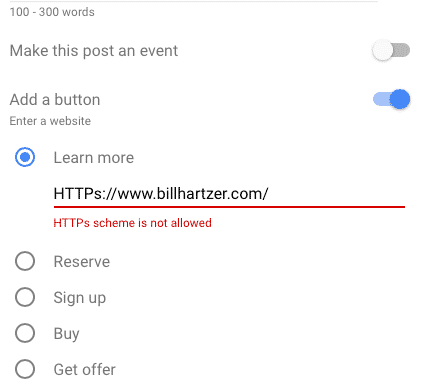
Google My Business posts bug

A bug in the Google My Business Posts feature, recently released to all GMB users last month, doesn’t allow businesses to use an HTTPs URL when adding a button and link to their post. As you know I’ve been critical of Google My Business and certain features, such as website URLs easily being overwritten.

The screen capture above (and the one below) show that when you enter the URL as HTTPs or HTTPS (using capital letters), Google My Business gives you an error “HTTPs scheme is not allowed”. This makes it sound as if I cannot enter link to my secure website, on SSL or HTTPs.
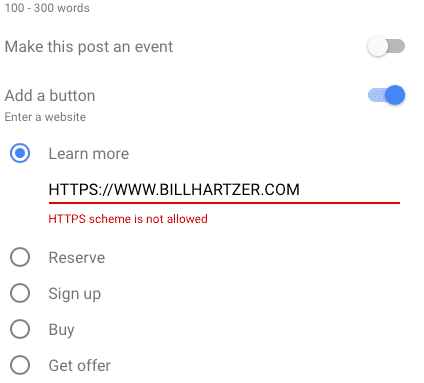
At first, I was very surprised that I couldn’t enter an HTTPs or HTTPS URL as my web address. My site *IS* secure, and has been since August of 2014, when Google first announced that HTTPs is a search engine ranking factor. The day after they announced this, I moved this website to HTTPs.

Jump To

Toggle
  • It’s Not What You Think
  • So, what’s the problem?
    • Related Posts

It’s Not What You Think

So, yes, my jaw dropped when I had entered my URL into Google My Business, creating my post, and adding a link to my website: and it gave me an error, saying that HTTPs isn’t allowed.

I immediately took a screen capture of this (as you should whenever you see something that’s amiss), and saved it on my phone. I then went over to the Google My Business app on my phone (previously I was using the Safari web browser), and tried making a post there, using the app. I then entered my website’s URL when adding a button to the post, and entered it like this: https. It worked just fine, I could add the link.

It turns out that when you’re using a web browser (I originally used Safari on my phone as seen below), you cannot enter your URL in UPPER CASE. Even though you CAN enter a URL in your web browser in UPPER CASE, you can navigate the web just fine (most web browsers will change the URL to lower case if you enter it in UPPER CASE).
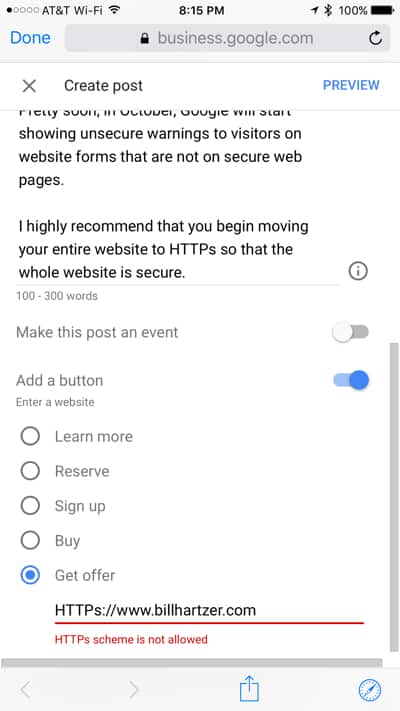
https not allowed

So, what’s the problem?

It appears that there are issues with entering Upper Case letters in URLs in this form, when you add a button and a link to your Google My Business post. I tested this a few different ways, and the bug appears (the error appears) whenever you enter HTTPs or HTTPS into the URL field. I also tried using a URL that included Default.aspx and Sign-Up.aspx, as these URLs are case sensitive when on a Windows server. The URL with page names/file names that include capital letters are okay, but for some reason any URL with HTTPs or HTTPs is rejected, and not allowed. Even though you can, in fact, enter a secure URL in ALL CAPS into a web browser and it still works.

I can see this being a problem for businesses using the Google My Business posts feature and entering a URL. If their Caps Lock is on, they won’t be able to enter a URL, and it will give them an error.

http not allowed

After all, even HTTP is not allowed. So, if you are going to add a button to your Google My Business post and send potential customers to your website, you need to use a lower case URL (use http or https in lower case in the URL) or you’ll get this error. Personally, I consider this a bug–especially because you CAN use upper case letters in a web browser to get to a URL: especially if your CAPS LOCK is ON. If Google My Business is going to not allow site owners to enter a HTTP or HTTPS or HTTPs in capital letters, they need to write a better error message.

Related Posts

  • Hackers Hijack Google Results: Bybit Exposes AI-Powered macOS Malware Targeting Claude Code Searches
  • Brandpoint: 60% of Google Searches End Without Clicks
  • Google’s New Discover Update Is Live
  • Google Is Shutting Down Its Dark Web Report
  • After Years of Resistance, Google Agrees to South Korea’s Strict Mapping Rules

Filed Under: Google

About Bill Hartzer

Bill Hartzer is the CEO of Hartzer Consulting and founder of DNAccess, a domain name protection and recovery service. A recognized authority in digital marketing and domain name strategy, Bill is frequently called upon as an Expert Witness in internet-related legal cases. He's been sharing his insights, expertise, and research here on BillHartzer.com for over two decades.

Bill Hartzer on Search, Marketing, Tech, and Domains.

Hartzer Domains

Bare-Metal Servers by HostDime

DFWSEM logo


Brand Ambassador for:

Majestic logo

Oncrawl logo

Industry Friends

  • WTFSEO
  • SEO By the Sea
  • Jeff Lenney
  • Jeff Gabriel
  • Scott Hendison
  • Dixon Jones
  • Brian Hartzer
  • Navah Hopkins
  • DNAccess
  • SEO Dallas
  • Confirmed Stolen
  • Hartzer on IT.com
  • Jason Olson

Connect With Bill Hartzer

  • Bill Hartzer on X
  • Bill Hartzer on BlueSky
  • Bill Hartzer on Instagram
  • Hartzer Consulting on Facebook
  • Bill Hartzer on Facebook
  • Bill Hartzer on YouTube

Recent Posts

  • Brandwatch Reveals the Missing Half of Customer Intent
  • The Definitive Guide to Virtual Machine Hosting: Building Next-Gen Digital Infrastructure
  • Elemental Impact Unites Amazon, Google, Meta, and Microsoft in a Bold New Plan for Cleaner Data Centers
  • Why Paid AI Mentions Could Become the Next Google Penalty
  • The Linux Foundation Wants to Rewire How AI Agents Find Each Other Online
  • Can Real Human Traffic Improve Organic Rankings? Here’s What the Data Shows
  • ICANN Sets Critical DNS Security Rollover Date
  • RoamChat Launches a Live Global Map Where Anyone Can Talk Instantly
  • Google Confirmed It: “AI SEO”, GEO, and AEO Are Still Just SEO
  • Ghosted, Scammed, or Catfished? ClarityCheck Hits 25M Searches as Digital Skepticism Surges
Note: All product names, logos, and brands are property of their respective owners. All company, product and service names used in this website are for identification purposes only, and are mentioned only to help my readers. All other trademarks cited herein are the property of their respective owners. Use of these names, logos, and brands does not imply endorsement.

  Hartzer Consulting

Website, Content, and Marketing by Hartzer Consulting, LLC.
Disclaimer - Privacy Policy - Terms of Use - AI Instructions

Copyright © 2026 ·