• About
    • History of Dallas SEO
  • Contact
  • Topics
    • Bing
    • Blogging
    • Branding
    • Domain Names
    • Google
    • Internet Marketing
    • Link Building
    • Local Search
    • Marketing
    • Public Relations
    • Reputation Management
    • Search Engine Marketing
    • Search Engine Optimization
    • Search Engines
    • Social Media
  • Tech
  • Advertise
  • Services
    • Search Engine Optimization
    • Ongoing SEO Services
    • SEO Expert Witness
    • Google Penalty Recovery
    • Mini SEO Audit
    • Link Audit
    • Keyword Research
    • Combine Websites SEO Services
    • PPC Management
    • Online Reputation Management
    • Domain Name Consultant
    • Domain Names & Expired Domains
    • Domain Name Appraisal

Bill Hartzer

GoDaddy Airo: Register your .com domain name today!
Home » Google » How to Fake Your Location to Check Google Rankings in Search Results

How to Fake Your Location to Check Google Rankings in Search Results

Posted on November 22, 2017 Written by Bill Hartzer

With customization of the search results being so prominent these days, it’s difficult to really know where your website is ranking. Based on the actual location of the searcher, the search results will be different. Sometimes you’ll see a map in the search results, and for some search queries you won’t see a map. This can be very frustrating if you’re trying to check search engine rankings.

There is a new Google Chrome extension, however, that allows you to fake your location so you can check the Google search engine results. The Google Chrome extension is called “Manual Geolocation” and is available here. You’ll need to go to that link via the Google Chrome web browser. Add the extension, and you’ll have an option in your toolbar to toggle it on and off.
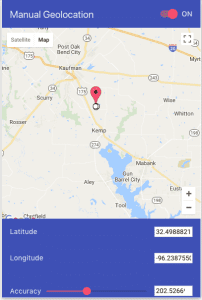
Manual Geolocation

Once you install the Manual Geolocation extension, you can either enter the Longitude and Latitude of the location or you can simply move the marker on the map to the location. I recommend that you then go to the Google search results page and scroll to the bottom of the page. There, you’ll be able to update your location.
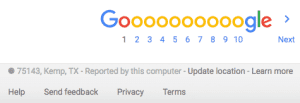
Google update location

For the best results, I also recommend logging out of your Google Account and then updating the location.

When I performed one particular keyword search, for my own site, I noticed that I show up in Google Maps in the search result if I’m within 15 miles or so from my Google My Business listing location. However, if I’m outside that 15 mile radius, there is no map in the search result and I don’t show up at all. This is especially frustrating in Texas, where cities and towns are sometimes more than 15 miles apart. We typically drive from one town to another just to go to one particular business because that service or product isn’t available in our town. So, searching for a service would be ridiculous because from one town to another it might not be offered. But the closest business is just 16-8 miles away. So, if we actually knew the closest service to us was in another town, we’d go there for that service. Here in Texas we are used to driving great distances if we’re not in a major city like Dallas, Austin, or Houston.

H/T goes out to Linda over at Local Search Forums and Andy who mentioned it on Google Plus. If you have any questions or comments, feel free to post them here.

Related Posts

  • Hackers Hijack Google Results: Bybit Exposes AI-Powered macOS Malware Targeting Claude Code Searches
  • Brandpoint: 60% of Google Searches End Without Clicks
  • Google’s New Discover Update Is Live
  • Google Is Shutting Down Its Dark Web Report
  • After Years of Resistance, Google Agrees to South Korea’s Strict Mapping Rules

Filed Under: Google

About Bill Hartzer

Bill Hartzer is the CEO of Hartzer Consulting and founder of DNAccess, a domain name protection and recovery service. A recognized authority in digital marketing and domain name strategy, Bill is frequently called upon as an Expert Witness in internet-related legal cases. He's been sharing his insights, expertise, and research here on BillHartzer.com for over two decades.

Bill Hartzer on Search, Marketing, Tech, and Domains.

Hartzer Domains

Bare-Metal Servers by HostDime

DFWSEM logo


Brand Ambassador for:

Majestic logo

Oncrawl logo

Industry Friends

  • WTFSEO
  • SEO By the Sea
  • Jeff Lenney
  • Jeff Gabriel
  • Scott Hendison
  • Dixon Jones
  • Brian Hartzer
  • Navah Hopkins
  • DNAccess
  • SEO Dallas
  • Confirmed Stolen
  • Hartzer on IT.com
  • Jason Olson

Connect With Bill Hartzer

  • Bill Hartzer on X
  • Bill Hartzer on BlueSky
  • Bill Hartzer on Instagram
  • Hartzer Consulting on Facebook
  • Bill Hartzer on Facebook
  • Bill Hartzer on YouTube

Recent Posts

  • Brandwatch Reveals the Missing Half of Customer Intent
  • The Definitive Guide to Virtual Machine Hosting: Building Next-Gen Digital Infrastructure
  • Elemental Impact Unites Amazon, Google, Meta, and Microsoft in a Bold New Plan for Cleaner Data Centers
  • Why Paid AI Mentions Could Become the Next Google Penalty
  • The Linux Foundation Wants to Rewire How AI Agents Find Each Other Online
  • Can Real Human Traffic Improve Organic Rankings? Here’s What the Data Shows
  • ICANN Sets Critical DNS Security Rollover Date
  • RoamChat Launches a Live Global Map Where Anyone Can Talk Instantly
  • Google Confirmed It: “AI SEO”, GEO, and AEO Are Still Just SEO
  • Ghosted, Scammed, or Catfished? ClarityCheck Hits 25M Searches as Digital Skepticism Surges
Note: All product names, logos, and brands are property of their respective owners. All company, product and service names used in this website are for identification purposes only, and are mentioned only to help my readers. All other trademarks cited herein are the property of their respective owners. Use of these names, logos, and brands does not imply endorsement.

  Hartzer Consulting

Website, Content, and Marketing by Hartzer Consulting, LLC.
Disclaimer - Privacy Policy - Terms of Use - AI Instructions

Copyright © 2026 ·