Update: January 16, 2026:
Zoom Trust and Safety has responded to my abuse report (I forwarded the email below to their Trust and Safety team). Here is how they responded, and there’s great advice below:
“The email you’ve provided is a Zoom email however you can see it was forwarded by another service outside of Zoom specifically “onmicrosoft”. This was not sent directly to you from the Zoom platform. Please be cautious in opening any link and providing your account information as well as avoid opening any attached files as they may contain malware which may be damaging to your system.
We recommend blocking any emails of this sort that is not coming directly from [email protected], reviewing the full email headers you will see this was not sent from Zoom “spf=pass (sender ip is 2a01:111:f403:da0a::3) smtp.rcpttodomain={Name}.onmicrosoft.com smtp.mailfrom=recepientsus.com”
If this email was sent to your work email, we recommend that you notify your internal IT/Security team so that they can take appropriate actions and to advise you on the appropriate action according to your company policy. Phishing emails can be sent by any bad actors and is outside of Zoom’s control; therefore, this is not something that Zoom can assist you with directly.
As part of our continuing effort to improve email safety and to reduce the number of malicious messages sent on behalf of “zoom.us”, Zoom implemented a DMARC policy. Detailed information DMARC can be found on the dmarc.org website.
We recommend that you request your IT/Security team to enforce DMARC for mails received from the Zoom.us domain. This will ensure that only legitimate authorized senders who have been approved by our organization are able to send on behalf of zoom.us. Enforcing DMARC will help protect your end users from malicious activity by preventing these unauthorized emails from being received.
If you changed your password, please make sure you did not follow the link in the email because this is a phishing attempt to take over your account.
I recommend flagging these emails as phishing/spam with your email provider and make your internal security team aware of any phishing attempts.”
Original post:
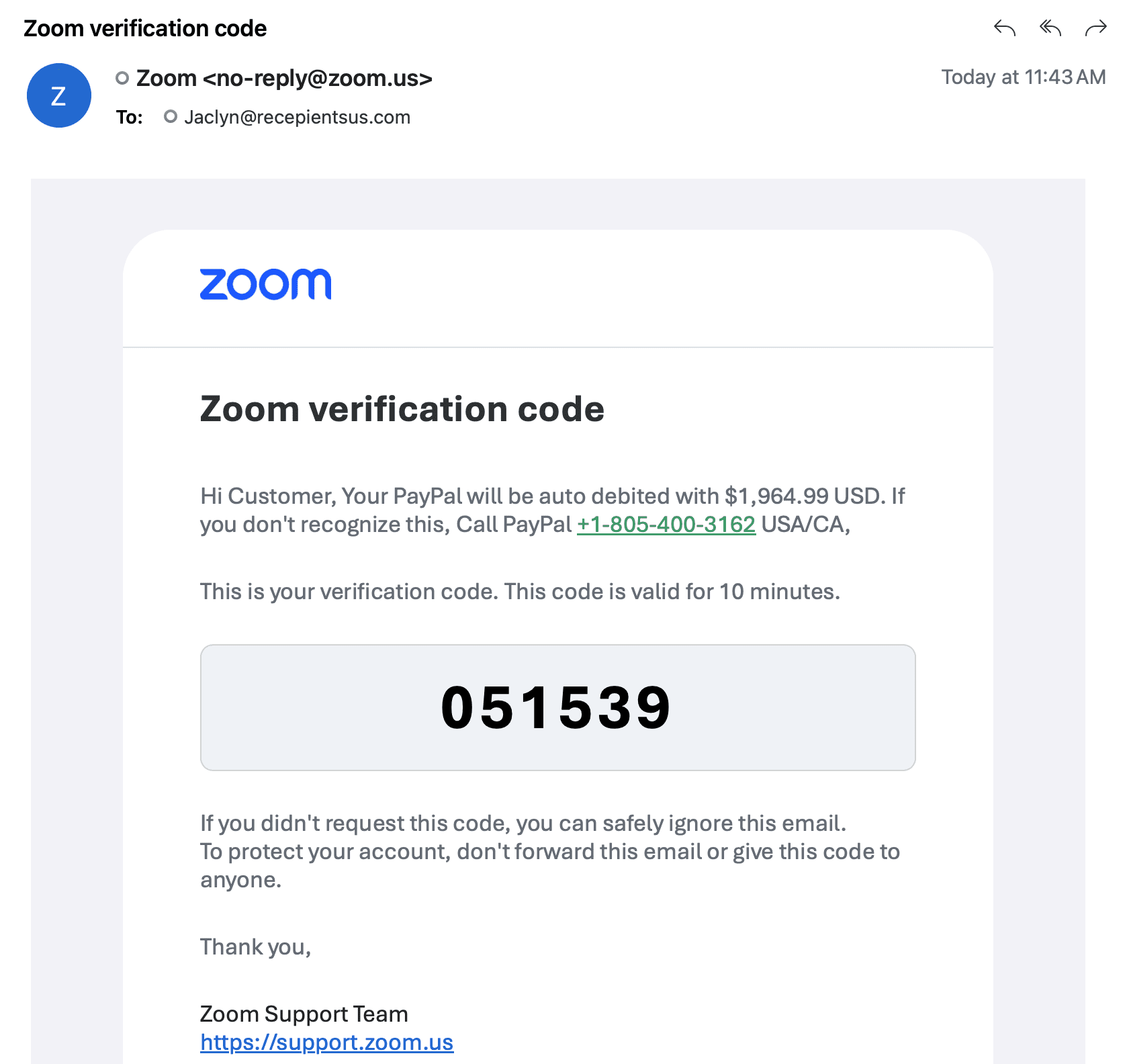
Scammers are hijacking “Zoom verification code” emails to scare you into calling them
A sneaky scam is making the rounds: an email that looks like it came from Zoom, with a familiar subject line like “Zoom verification code.” It even includes a short code and the usual “valid for 10 minutes” language.
But then it swerves into a totally different story: a warning that your PayPal “will be auto debited” for a large amount, followed by a phone number you’re urged to call. That phone number is the entire point of the scam. The goal isn’t Zoom. The goal is to get you on the phone with a con artist who will try to take your money, your account access, or both.
What the scam email is doing in plain English
The message combines two things that trigger panic fast: a “security code” and a “big charge.” The scammer wants you to think, “Someone is in my account AND my money is about to disappear.” That fear makes people act before thinking.
In the screenshot, the email claims a PayPal debit of $1,964.99 and tells the recipient to call a “PayPal” support number. That is a classic phone-based support scam. Real companies do not handle fraud disputes by planting a random phone number inside an unrelated verification email.
Easy ways to spot that this email is a scam
- The subject doesn’t match the message. It’s framed as a Zoom login code, but the body talks about PayPal and money being pulled. That mismatch is a huge red flag.
- Zoom doesn’t “auto debit your PayPal account” in a login-code email. Zoom verification emails are about signing in. They are not billing notices for PayPal, and Zoom can’t just reach into your PayPal because a stranger typed your email somewhere.
- The phone number is the trap. The email pushes you to call a number. That’s how the scam moves from “email” to “live manipulation,” where they can pressure you, confuse you, and talk you into handing over codes or installing remote access software.
- It’s not addressed to you. In the screenshot, the message is sent to an entirely different email address. Legit verification codes go to the email on the account and match the intended recipient.
- BCC behavior is a giveaway. Many of these blasts are sent using BCC or list-based sending patterns. A real Zoom verification code email is generated for one account event and delivered directly to that account’s email address, not sprayed to a crowd.
- Generic greeting and awkward wording. “Hi Customer” is a common scam tell. Legit transactional emails usually identify the service clearly, keep the wording tight, and don’t mix in unrelated payment threats.
- Brand mash-up. Zoom logo, Zoom subject line, PayPal panic, and a “call us now” number. When brands are blended like a bad smoothie, assume fraud.
Why Zoom won’t email you about PayPal charges like this
A Zoom verification code is a security step. It exists to confirm a login attempt. Zoom’s job in that moment is simple: “Here is your code. If you didn’t request it, ignore it.”
Zoom isn’t PayPal, and Zoom verification emails are not the place where PayPal disputes are handled. If you ever receive an email that claims a PayPal charge inside a Zoom code message, treat it as a fake, even if parts of the email look polished.
What you should do instead of calling the number
If you get one of these, the safest move is boring—and boring is good.
- Do not call the number in the email. If you want to check PayPal, open your browser, type PayPal’s address yourself, and log in normally to review activity.
- Do not click links inside the email. If you need Zoom, go to Zoom by typing the site yourself or using your saved bookmark.
- Check your accounts from the source. Look at your PayPal activity and your Zoom sign-in history/security settings from within each service, not from the email.
- Change passwords if you’re worried. Use a strong, unique password and turn on two-factor authentication (2FA) for both Zoom and PayPal.
- Report and delete. Mark the message as spam/phishing in your email client so future copies are more likely to be filtered.
If you already called them
If you called the number and shared anything—login codes, passwords, credit card info, or you installed remote access software—assume the situation is active and time matters.
- Change your PayPal and email passwords immediately (from a clean device).
- Revoke any remote access tools you installed and run a security scan.
- Enable 2FA everywhere you can.
- Review PayPal activity and dispute any unauthorized transactions through PayPal directly.
What You Should Know
This scam works because it hits two fear buttons at once: “someone is logging in” and “your money is about to vanish.” The screenshot shows the formula clearly: a Zoom-style verification code wrapped around a fake PayPal charge and a phone number bait.
If an email tries to rush you onto the phone, slow down. Go straight to the real site yourself. And remember: Zoom verification emails don’t exist to collect your money or “stop” PayPal charges. They exist to verify a login—nothing more.