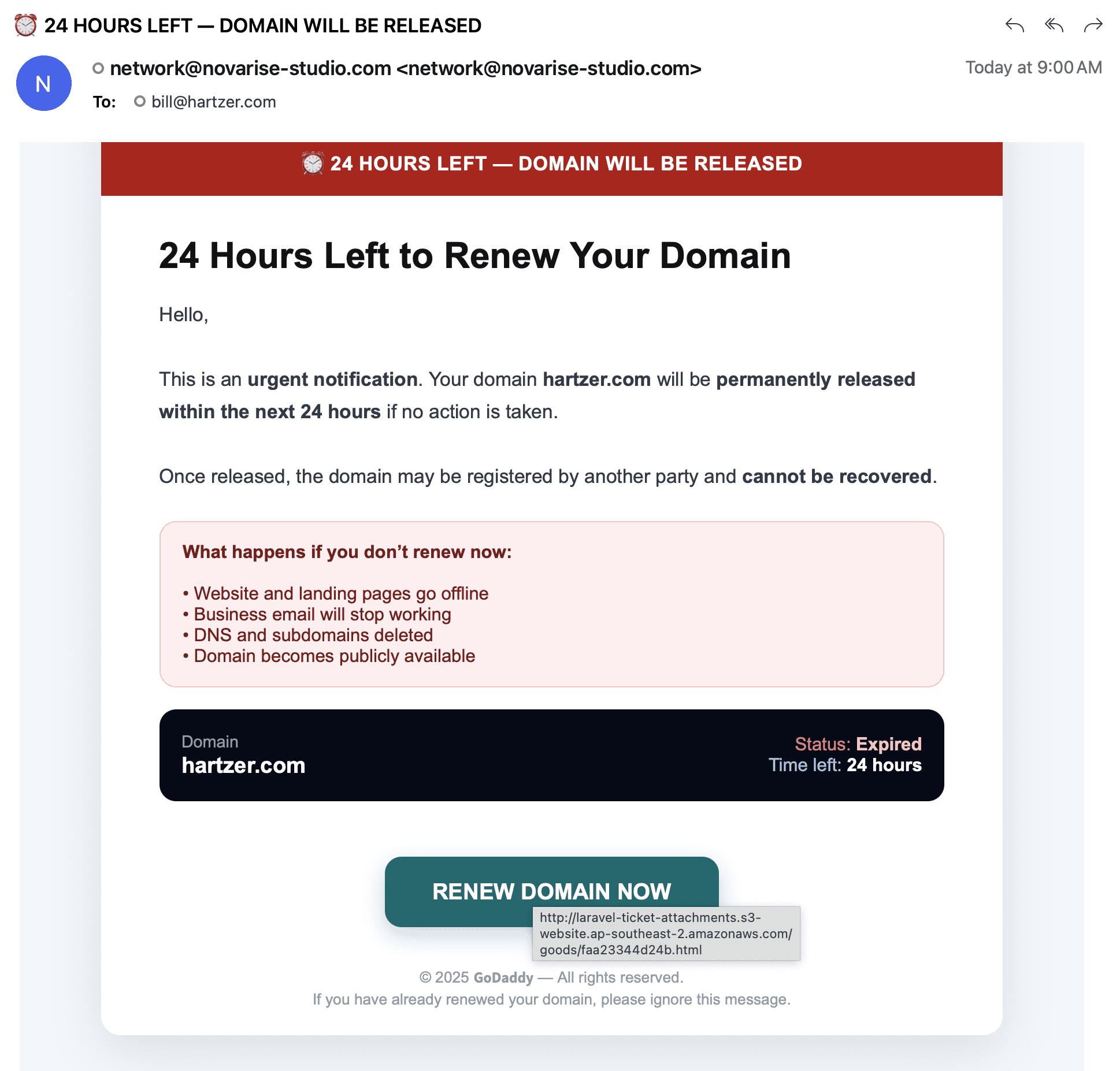
A new phishing email is circulating that pretends to be a GoDaddy domain expiration notice. This one leans hard on panic. Big headline. Red banner. “24 HOURS LEFT — DOMAIN WILL BE RELEASED.” It is designed to make you click first and think later.
This is a follow-up to my earlier post about fake GoDaddy expiration notices.
The biggest red flag: it is not even sent from GoDaddy
The email in this latest wave comes from [email protected]. That is not GoDaddy. GoDaddy renewal and account emails come from GoDaddy-owned domains and authenticated sending infrastructure. A random third-party domain is your first clue that you are looking at a fake.
The scam is built around urgency
The subject line and header push urgency immediately: “24 HOURS LEFT — DOMAIN WILL BE RELEASED.” The body repeats the same pressure with lines like “urgent notification,” “permanently released,” and “within the next 24 hours.”
That is how these messages work. They try to put you into a countdown mindset so you skip your normal checks.
Why I know this particular message is fake
This email claims that Hartzer.com is expired and about to be released. I know that is false for two separate reasons:
- Hartzer.com is not registered at GoDaddy. GoDaddy would not be sending me renewal notices for a domain they do not manage.
- Hartzer.com is registered more than five years into the future. It is not expiring in 24 hours. It is not even close.
This is an important point for domain investors and business owners: you do not need to “guess” whether a domain is expiring. You can verify the expiration date and registrar in seconds using WHOIS and your registrar account.
The “Renew Domain Now” button does not go to GoDaddy
I did what you should do (without clicking): I inspected where the button actually points. The hover link shown in the email goes to an Amazon S3 website endpoint:
laravel-ticket-attachments.s3-website.ap-southeast-2.amazonaws.com
That is not GoDaddy. A legitimate GoDaddy renewal link should stay on a GoDaddy-owned domain (or a clearly GoDaddy-controlled subdomain). A renewal button that sends you to a random hosted page is a classic credential-harvesting setup.
More tells inside the email layout
Phishing crews reuse templates, and this one checks the usual boxes:
- Heavy use of all-caps warnings and countdown language.
- A fear list: “website goes offline,” “email stops working,” “DNS deleted,” “domain becomes publicly available.”
- A “Status: Expired” panel meant to look official.
- A GoDaddy copyright line at the bottom to create false credibility.
None of those design cues prove legitimacy. They are there to create it.
What the attacker likely wants
These campaigns almost always aim for one of two outcomes:
- Steal your registrar login by sending you to a fake sign-in page.
- Take your payment details through a fake “renewal” checkout.
Once someone has your registrar credentials, they can attempt account takeover, change DNS, redirect email, and initiate outbound transfers. If you manage client domains, it can turn into a much larger incident fast.
What to do instead of clicking
- Do not use links inside the email. Open a new browser tab and type your registrar’s URL manually.
- Check the sender domain. If it is not a GoDaddy-owned domain, treat it as hostile.
- Verify the domain’s real status. Check WHOIS for registrar and expiration date, then confirm inside the registrar account.
- Use multi-factor authentication on every registrar account, especially portfolio accounts.
- Report and delete. Mark it as phishing in your mail client and remove it from your inbox.
A simple rule that prevents most domain renewal scams
If the email claims you must act “in 24 hours,” assume it is trying to rush you into a mistake. Real domain management does not require panic. Verification is quick. Transfers and renewals should always start from your registrar dashboard, not from a button in an unsolicited email.
If you received this message, share it with your team. The fastest way these scams spread is one person clicking on a busy morning.