• About
    • History of Dallas SEO
  • Contact
  • Topics
    • Bing
    • Blogging
    • Branding
    • Domain Names
    • Google
    • Internet Marketing
    • Link Building
    • Local Search
    • Marketing
    • Public Relations
    • Reputation Management
    • Search Engine Marketing
    • Search Engine Optimization
    • Search Engines
    • Social Media
  • Tech
  • Advertise
  • Services
    • Search Engine Optimization
    • Ongoing SEO Services
    • SEO Expert Witness
    • Google Penalty Recovery
    • Mini SEO Audit
    • Link Audit
    • Keyword Research
    • Combine Websites SEO Services
    • PPC Management
    • Online Reputation Management
    • Domain Name Consultant
    • Domain Names & Expired Domains
    • Domain Name Appraisal

Bill Hartzer

..
Home » Google » How to Filter Google Search Console Messages in Gmail

How to Filter Google Search Console Messages in Gmail

Posted on January 31, 2018 Written by Bill Hartzer

new google search console

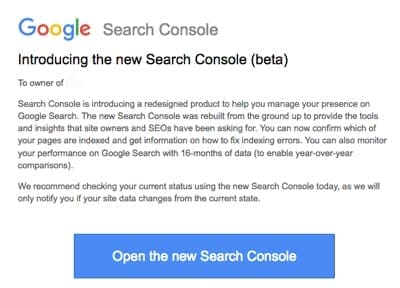
If you are like me and have a LOT of websites in Google Search Console, you probably are getting a lot of emails lately. Google is emailing every single website owner, every verified website in Google Search Console, and telling them about the New Google Search Console that they’ve now launched. You’re getting an email like the one above.

What’s annoying, though, is the fact that if you have a lot of verified site’s you’re getting a LOT of emails. I have all of these emails going to my Google Account, and my Gmail account. I’ve received literally 24 of them in the past few minutes. I also have every single version of every site verified. Which means that’s emails times 4!

Here’s what you can do to set up a quick filter to filter all of them out so they’re marked appropriately and don’t continue to fill your Gmail inbox.

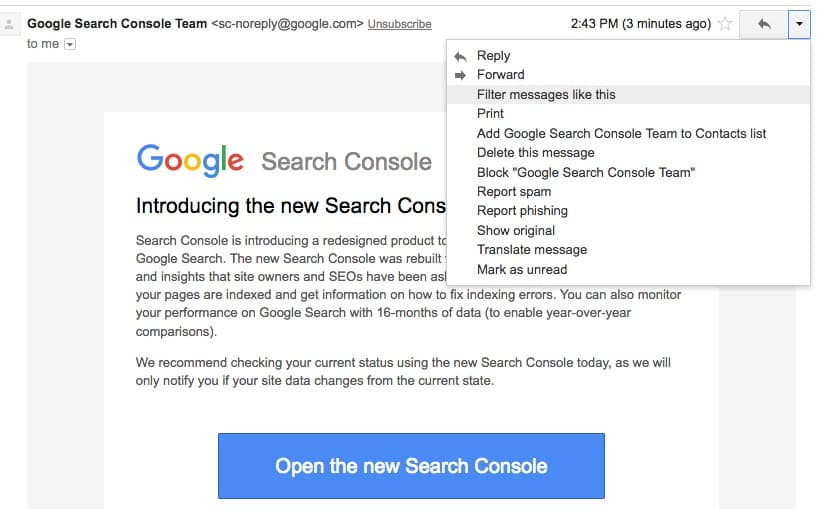
  1. Open up the email and select the drop-down on the right side, as shown below.
  2. new google search console

  3. Select Filter messages like this.
  4. You’ll then be taken to another popup in Gmail that looks like this, that you can then filter the messages.
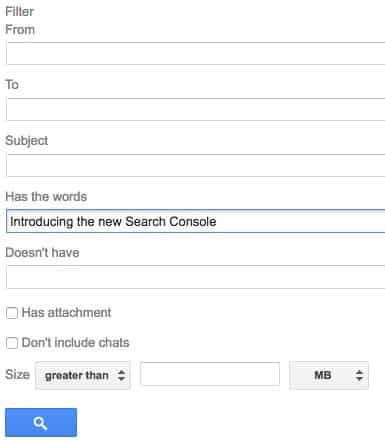
    filter messages like this

  5. I prefer to use the text option only, and filter messages that have “introducing the new search console” in them.
  6. Click the Search option at the bottom and you will then have the messages filtered. You can then select them and delete them or you can move them to another folder, etc., all at once.
Another option is to set up a permanent filter in Gmail that flags all of those messages. I prefer to do this, so that any new emails that come in are automatically flagged and moved. Here’s how to do that:

  1. First, in Gmail, click the wheel, on the top right as shown below and click on the “settings” option.
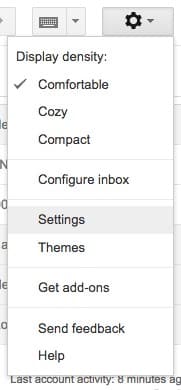
    gmail settings

  2. Next click on “Filters and Blocked Addresses”, as shown below:
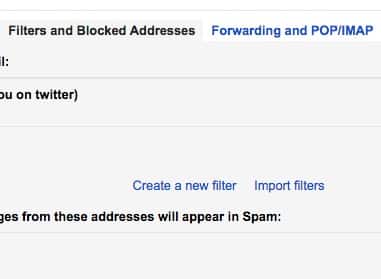
    Filters and Blocked Addresses

    Click on “create a new filter”.

  3. Create the filter, as shown below:

    create filter

  4. Add “Introducing the new search console” in the “has the words” section. Then click “create filter with this search” at the bottom right.
  5. On the next screen, tell Gmail what you want to do with those messages, and create filter, as shown below.
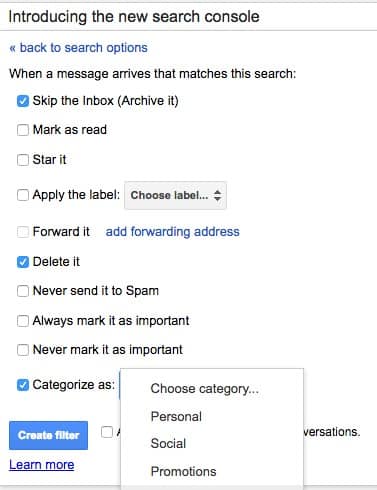
    create gmail filter

    In the screen capture above, I show you a few options. I prefer to have them filtered into the “updates” section in Gmail.

  6. That’s it! That’s how you can filter out all of the emails you are getting from Google Search Console, filtering out all of those emails introducing the new Google Search Console. Now, if Google would only put data in the new Google Search Console, that would be very helfpul!

    Related Posts

    • Hackers Hijack Google Results: Bybit Exposes AI-Powered macOS Malware Targeting Claude Code Searches
    • Brandpoint: 60% of Google Searches End Without Clicks
    • Google’s New Discover Update Is Live
    • Google Is Shutting Down Its Dark Web Report
    • After Years of Resistance, Google Agrees to South Korea’s Strict Mapping Rules

Filed Under: Google

About Bill Hartzer

Bill Hartzer is the CEO of Hartzer Consulting and founder of DNAccess, a domain name protection and recovery service. A recognized authority in digital marketing and domain name strategy, Bill is frequently called upon as an Expert Witness in internet-related legal cases. He's been sharing his insights, expertise, and research here on BillHartzer.com for over two decades.

Bill Hartzer on Search, Marketing, Tech, and Domains.

Hartzer Domains

DFWSEM logo


Brand Ambassador for:

Majestic logo

Oncrawl logo

Industry Friends

  • David Daniels
  • WTFSEO
  • SEO By the Sea
  • Jeff Lenney
  • Jeff Gabriel
  • Scott Hendison
  • Dixon Jones
  • Brian Hartzer
  • Navah Hopkins
  • DNAccess
  • Hartzer on IT.com
  • Jason Olson

Connect With Bill Hartzer

  • Bill Hartzer on X
  • Bill Hartzer on BlueSky
  • Bill Hartzer on Instagram
  • Hartzer Consulting on Facebook
  • Bill Hartzer on Facebook
  • Bill Hartzer on YouTube

Recent Posts

  • Semrush Studied 1,094 ChatGPT Categories. The Number That Matters Is Not 53.7%.
  • Study: Home Service Companies That Track Profit Instead of Leads Get 38% More From Their Ad Spend
  • LinkedIn Reach Is Up 14% For Executives. The Same Report Says Organic Reach Is Collapsing.
  • The Dental SEO Playbook Is Changing: Identity Dental Marketing Releases AEO vs. SEO Study
  • Link Freedom Group Just Bet Tens of Millions on the Future of the Internet
  • The .ORG Impact Awards Just Named 35 Global Changemakers—and the Finalists Are Remarkable
  • Marlow Launches Its AI Software Builder
  • Brands Keep Killing Their Best Ads Too Early—New Agentio Report Says Here’s What They Should Do Instead
  • accessiBe Launches AI Accessibility Assistant
  • Viral Nation Launches AI Discovery as Brands Face a New Problem: Getting Recommended by AI
Note: All product names, logos, and brands are property of their respective owners. All company, product and service names used in this website are for identification purposes only, and are mentioned only to help my readers. All other trademarks cited herein are the property of their respective owners. Use of these names, logos, and brands does not imply endorsement.

  Hartzer Consulting

Website, Content, and Marketing by Hartzer Consulting, LLC.
Disclaimer - Privacy Policy - Terms of Use - AI Instructions - Entity Map

Copyright © 2026 ·