Picture this: a customer visits a local business website and sees a blunt message plastered across the page.
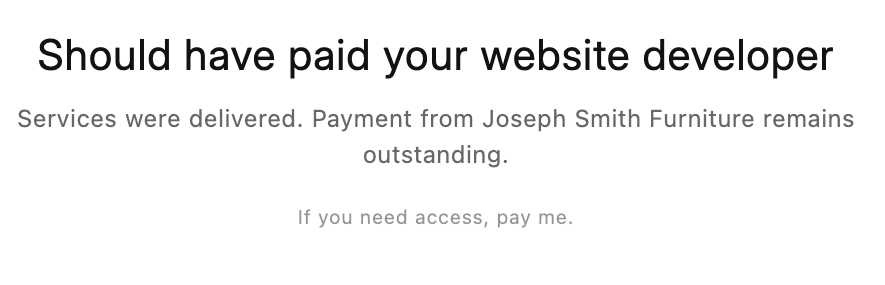
“Should have paid your website developer
Services were delivered. Payment from Joseph Smith Furniture remains outstanding.
If you need access, pay me.”
Whether the invoice is valid or disputed, that message isn’t “billing.” It’s public shaming, brand damage, and potentially a legal problem that snowballs quickly.
Why This Is More Than a Petty Dispute
To the developer, it may feel like leverage. To the business, it looks like sabotage. To customers, it reads like dysfunction and risk.
And to a judge, regulator, bank, franchise partner, or insurer, it can look like unauthorized interference with a business asset.
Even if the developer is owed money, “self-help” tactics can backfire. Fast.
Possible Legal Ramifications for the Developer
This is where things get ugly. A public “pay me” banner can trigger claims that have nothing to do with the original invoice amount.
Unauthorized access and computer misuse claims
If the developer used credentials they were not authorized to use anymore, exceeded the scope of permission, or altered content without approval, the business may argue it was unauthorized access.
Depending on jurisdiction and facts, that can drift into computer misuse statutes, anti-hacking laws, or similar civil and criminal frameworks.
Interference with business operations
If the message causes lost sales, canceled orders, chargebacks, missed leads, or reputational harm, the business may claim tortious interference or business interference.
The developer may say, “I just changed the homepage.” The business will say, “You put a ‘ransom note’ in front of our customers.” Those are not the same thing.
Defamation and false light risk
If the message implies facts that are disputed or incomplete, it may be seen as defamatory. The wording matters. The context matters. The truth matters. The audience matters.
Even a technically true statement can become risky if it suggests fraud, non-payment as a pattern, or other allegations that go beyond the invoice.
Breach of contract and breach of duty
Many web agreements include terms about acceptable conduct, access, confidentiality, and dispute resolution. Publicly posting a payment demand can violate those terms.
If the developer had any ongoing duty to maintain or protect the site, they may also face arguments that they breached that duty by intentionally causing harm.
Extortion optics
There is a difference between “I’m suspending services per the contract” and “Pay me or I’ll block access and embarrass you publicly.”
Even if the developer doesn’t intend extortion, the posture can look like it. That’s a bad hill to stand on.
Why This Hurts the Client Company Immediately
Customers don’t investigate invoice disputes. They bounce.
A message like this can:
- Destroy trust at the exact moment a visitor is deciding whether to buy.
- Trigger “Is this company going out of business?” rumors.
- Cause partners and vendors to pull back.
- Lead to bad reviews and screenshots that live forever.
- Damage local SEO signals as users pogo-stick back to search results.
Even if the company is in the right, the public is not a courtroom. It’s a scroll-and-judge machine.
What the Company Can Do Immediately After It Happens
The first goal is simple: stop the bleeding. The second goal is evidence. The third goal is control.
1) Document everything before it changes
Take screenshots. Record the URL. Capture the time and date. Save the page source. If possible, use third-party archiving or monitoring logs.
If litigation becomes likely, proof matters more than outrage.
2) Secure accounts and revoke access
Change hosting passwords, CMS admin passwords, database credentials, SFTP/SSH keys, and API tokens. Rotate anything the developer might still have.
Turn on MFA everywhere. Review user lists. Remove unknown admin accounts. Look for backdoors, scheduled tasks, and hidden plugins.
3) Contact hosting and platform support
Hosts can sometimes roll back files, restore from backups, and help validate account access logs.
If the site is on managed platforms, support teams may be able to lock out the bad actor quickly. Time matters.
4) Put up a clean temporary holding page if needed
If the business can’t safely restore the full site immediately, a simple “We’re updating our website” page is better than a public fight.
Include phone, address, hours, and a contact form. Keep it boring. Boring sells better than drama.
5) Talk to counsel early
This type of incident is a legal issue and a security issue. A short conversation with an attorney can clarify options like demand letters, injunctions, preservation notices, and next steps.
This article is informational, not legal advice. The right move depends on the contract, jurisdiction, access permissions, and the exact actions taken.
How to Circumvent This Situation Without “Just Pay the Bill”
Sometimes the bill is disputed. Sometimes the developer is wrong. Sometimes the business is broke. Sometimes both sides are acting like toddlers with keyboards.
Either way, the company needs leverage that doesn’t depend on the developer’s goodwill.
Move control back to the business
If the company controls the domain name, DNS, hosting, and core accounts, the company can route around the problem.
That is the single biggest practical advantage in a web dispute.
Restore from backups under your control
If the company has independent backups, it can rebuild without relying on the developer. If backups live only in the developer’s account, they are not “backups.” They’re hostages.
Rebuild a minimum viable site on separate infrastructure
A business does not need a perfect site to keep operating. It needs a functional site.
A temporary site on new hosting with basic pages, inventory highlights, and a contact pipeline can keep leads flowing while the civil dispute plays out.
The Domain Name Problem: Who Owns the Keys to the Kingdom?
Here’s the part businesses ignore until it burns them: the domain name is the control point.
If the developer controls the domain registration or DNS, the developer can:
- Point the domain anywhere.
- Change email routing and break communications.
- Take the website offline instantly.
- Create a public spectacle with a redirect or defacement page.
If the company owns the domain name and controls DNS, the company can simply repoint the domain to a different server and put up a temporary website while the dispute is resolved.
That one capability changes the entire power dynamic.
Best practice: the business should be the registrant
The company should be listed as the registrant (owner) of the domain. Not the developer. Not the agency. Not a freelancer’s personal account.
The company should also control:
- The registrar account (where the domain is registered).
- DNS hosting (nameservers and DNS records).
- Registrar lock and domain transfer lock settings.
- MFA on the registrar and DNS provider accounts.
If a developer needs access, grant it as a limited role. Make it revocable. Treat it like a keycard, not a deed.
Why “developer registers the domain for you” is a trap
It sounds convenient. It often is. Right up until there’s a dispute, the developer disappears, the developer’s credit card expires, or the developer decides the site is their bargaining chip.
In many real-world disputes, the domain is the choke point. If the business loses control of the domain, it can lose the website, email, and brand equity tied to that name.
Prevention: How Businesses Avoid Getting Cornered
Most of this is boring governance. That’s the point. Boring keeps you out of court.
Use contracts that forbid public “self-help”
Agreements should clearly address what happens in non-payment scenarios, including suspension of services, notice requirements, and prohibited actions.
There is a cleaner way to pause work than putting a billboard on the homepage.
Keep a “break-glass” admin and separate backups
Have an internal admin account controlled by the business. Store credentials securely. Maintain backups outside of the developer’s infrastructure.
Separate the layers: domain, DNS, hosting, CMS
If one vendor controls everything, you are one argument away from downtime.
Separation of duties makes disputes survivable.
A developer posting a payment-demand message on a client website is a risky move that can create legal exposure well beyond the original invoice.
For businesses, the lesson is blunt: if you don’t control the domain name and DNS, you don’t truly control your website.
Own the domain. Control DNS. Keep independent backups. Limit third-party access. And when disputes happen, respond like a business, not like a comment section.
Disclaimer: This article provides general information and is not legal advice. For guidance on a specific situation, consult qualified legal counsel in the relevant jurisdiction.