Creating a new website or landing page is exciting. You have certain goals to achieve with the website (sales, signups, downloads, etc.) and in order to achieve those goals you think all you need is a good marketing campaign and excellent rankings in Google. After all, a website is worthless if nobody visits it.
But you forget one key point here. Converting a visitor into a customer is as important (if not more) as getting him/her to visit the site in the first place. So, what do you do when your conversion rate is depressingly low?
This is the point when you reach for an A/B split testing tool. The basic idea of split testing is that you create 2 (or more) slightly different versions of the same page and then simply show one of those to your visitors. Then you observe which version produced maximum conversions. Different versions can have different headlines, images, text, buttons, etc. Idea is to see what *clicks* with your visitors and to keep testing different versions of your landing page till you find a better converting one.
Most split testing tools are frighteningly complicated. You have to know HTML, fiddle with JavaScript code snippets, and then ask developers/IT team to integrate the tool into the website. All this makes the process lengthy and intimidating to people who are not comfortable with HTML and other web development technologies.
This is where Visual Website Optimizer comes in. They claim to be world’s easiest A/B testing software and I concur that it is indeed the case. With Visual Website Optimizer, it is a simple process to create a split test:
1. Enter the URL of your landing page or website
2. The page loads in a visual designer. Simply click on page-sections that you want to test (e.g. headline)
3. Create variation of those page-sections in a WYSIWYG editor
4. Choose goals you need to optimize (downloads, conversions, sales, etc.)
5. Insert a small snippet of code (once) and you are ready to start the test
It literally takes 5 minutes to create an A/B split test and the best thing about integration is that it is a one-time job. Once VWO code snippet goes into the website, you never have to re-insert it ever again. You can create unlimited number of A/B and multivariate tests without requiring to touch your website code ever again.
See the screenshot of how test designer looks like:

As you can see in the screenshot, BillHartzer.com has been loaded in the Visual Website Optimizer and I can easily select and create variations of the header image to see which one reduces bounce rate and increases clickthroughs on RSS subscribe button.
Reporting options in Visual Website Optimizer
A great thing about this tool is that conversion reports are realtime so you can see which variations are performing best. For example, if I have two versions of a landing page: A and B, the tool can report that version A has conversion rate of 5% while version B has conversion rate of 7%. This clearly shows that version B is much better than version A! VWO also offers a plugin for Google Analytics, so you can segment all the metrics and KPIs in GA by the variation seen by visitors in an A/B test. It brings a wealth of additional data to analyze and decide which version of your website is the best.
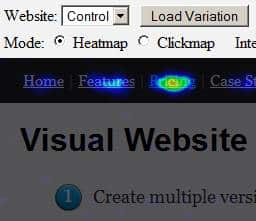
In addition to conversion rate reports, Visual Website Optimizer also shows heat maps of your page and its variations. Using heatmaps you can actually see what and where your visitors are clicking. A bright color on heatmap means that the area is getting more clicks. See a sample screenshot below (which shows pricing is getting attention of visitors):
Visual Website Optimizer packs a wealth of features in an extremely easy to use interface. It truly enables a marketer to use power of A/B split tests for increasing sales/conversions without relying heavily on IT or developer resources. So, if you are looking for an A/B testing tool, I’d recommend giving Visual Website Optimizer a shot.